Skip to content

React.js 17: No New Features and New JSX Transform

React.js 17: No New Features and New JSX Transform

This article was written over 18 months ago and may contain information that is out of date. Some content may be relevant but please refer to the relevant official documentation or available resources for the latest information.

React.js 17: No New Features and New JSX Transform

When React.js 17 became available on October 20th, it generated some confusion because it has no new developer-facing features.

Instead, the React Core team focused on making the React library easier to self-upgrade in the future. This means, that if your app is running React 17 and you need to upgrade some features to React 18, you can move your application core to React 18 and lazily load the legacy code without any issues.

Of course, you can still upgrade your entire app the new version at once, which is the recommended version by the React team.

Installation

To install React 17 with npm, run:

npm install react@17.0.0 react-dom@17.0.0

To install React 17 with Yarn, run:

yarn add react@17.0.0 react-dom@17.0.0

Internal improvements

New JSX Transform

One of the greatest internal improvements React 17 has is the new JSX transform. Prior to React 17, when you write JSX code, it was transformed to a React.createElement call.

So, it looked something like this:

import React from 'react'

const App = () => {
  return <h1>Hello World</h1>
}

export default App

Was transformed to this:

import React from 'react'

const App = () => {
  return React.createElement('h1', null, 'Hello World')
}

export default App

Starting on React 17, you don't need to import React from 'react' anymore. Instead, two new entry points were added to the React package that are intended to be used only by compilers like Babel or TypeScript. So for the above JSX code, the output will be slightly different:

import { jsx as _jsx } from 'react/jsx-runtime'

const App = () => {
  return _jsx('h1', { children: 'Hello world' })
}

export default App

So, your app won't need to import React from 'react' anymore. Instead, you can directly write your JSX code:

const App = () => {
  return <h1>Hello World</h1>
}

export default App

Next.js was known to allow the above because under the hood, it imported React. However, they changed this in their 9.5.3 release in order to use the new transform.

Updating ESlint rules

If you are using the eslint-plugin-react package, you may notice not importing React will generate an issue. For that, you can just disable those rules while they remove those rules.

eslintrc.json

{
  // ...
  "rules": {
    // ...
    "react/jsx-uses-react": "off",
    "react/react-in-jsx-scope": "off"
  }
}

Removing Unused React Imports

Luckily, the React team has created a codemod you can run to remove your old React imports. To run it, just open a new terminal on your project directory, and run the following script:

npx react-codemod update-react-imports

A new Event Delegation System

To enable gradual updates, the React team changed its internal Event Delegation System, which works like this:

Before React 17, all event handlers were attached at the document level under the hood, so it ran document.addEventListener() for most events.

After React 17, it attached all event handlers to the root element where you render your app, which calls rootNode.addEventListener() instead.

To better understand how the new Event Delegation System works, take a look at this diagram:
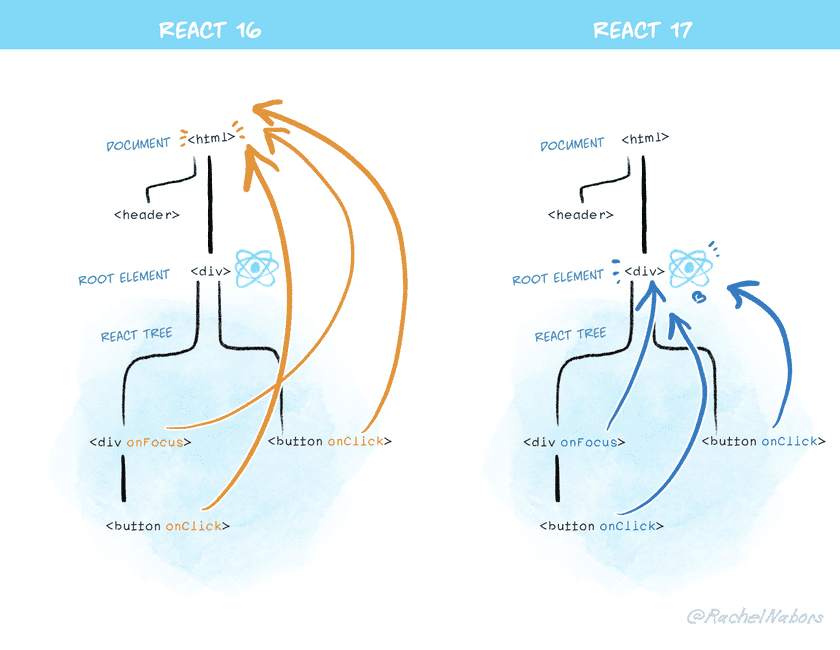
New React Event Delegation System

You can take a look at a demo of gradual updates on an example repository put together by the React team.

Other Breaking Changes

There are other minor breaking changes that hopefully won't affect your application. They are mostly internal changes, like the onScroll event no longer bubbling, onFocus and onBlur events switching to use the native focusin and focusout under the hood, removing the old event pooling optimization, and making the effect cleanup timing more consistent.

To go deeper into these other breaking changes, you can take a look at the React v17 RC Breaking Changes.

This Dot is a consultancy dedicated to guiding companies through their modernization and digital transformation journeys. Specializing in replatforming, modernizing, and launching new initiatives, we stand out by taking true ownership of your engineering projects.

We love helping teams with projects that have missed their deadlines or helping keep your strategic digital initiatives on course. Check out our case studies and our clients that trust us with their engineering.

You might also like

React Conf 2024 Review cover image

React Conf 2024 Review

A lot has happened since the last React Conf, so 2024 was action-packed. The conference lasted two days in Las Vegas and was focused on all the new stuff coming with React v19. Day one was centered around React 19/Server Components, and day two was React Native. There were some exciting reveals, fantastic talks, and demos. This post will cover the conference's big news, specifically the main keynotes from days 1 and 2. Day 1 Keynote The main keynote included several speakers from the React team, and early in the talk they mentioned a goal of “Make it easy for anyone to build great user experiences.” This sounds great but I was curious to see exactly what they meant by this since it seems like React has arguably gotten more complex with the introduction of Server Components and related API’s. The keynote was split into 3 sections: State of React - Lauren Tan Lauren shared the staggering adoption React has received over the years and thanked all the contributors and the community. She also highlighted the amazing ecosystem of packages, tools, and frameworks. It’s hard to argue against these points, but React seems to be in a weird in-between state. The framework is headed in this new direction but doesn’t feel quite there yet. React 19 A few team members collaborated on a walkthrough of React 19, which included all the new features and a bunch of quality-of-life improvements. The main highlights were: * Server Rendering & Suspense - One of the coolest bits was showing how to co-locate and load stylesheets and other assets in components. “HTML Composition for Bundlers, Libraries, & Apps” * Hydration - This was a fan favorite, and the TL;DR is fewer hydration errors with better messages and debuggability. * Actions - This is one of my favorite new features, as it feels like something that was missing from the React toolkit for a long time. The new Actions API is a “First-class pattern for asynchronous data updates in response to user input”. It includes Remix inspired form behaviors and API’s that replace a lot of boilerplate for handling async operations like loading and error states. * JSX Improvements One of the most applauded announcements was the changes to refs, which are now automatically passed to every component 🙌 React Compiler !! Yes, we’ve all heard the news by now. They are finally open sourcing the compiler that they teased over 2 years ago. React compiler understands React code/rules and is able to automatically optimize/memoize our application code. One of the big complaints of React has long been that there’s a lot of mental overhead and thought that needs to be put into optimizing and building fast components. So, the goal is to remove that burden from the developers so that they can focus on writing their business logic. One of the slides mentioned that the compiler has the following behaviors: Dead Code Elimination, Constant Propagation, Type Inference, Alias Analysis, Mutable Lifetime Inference, HIR, and Diagnostics. I’m not going to pretend to know all those things, but I’ve already heard a lot of positive feedback about how it works and how advanced it is. The team mentioned that they are already running the compiler in production on Instagram.com and some of their other websites. Day 2 Keynote Day 2 opened with sharing the incredible growth in downloads and adoptions that React Native has had (78M downloads in 2023). They shared some meta info about the recent releases and talked about all the partners helping to push the framework forward. They mentioned the Meta investment in React Native and shared about some of the ways that they are using it internally in places like Facebook Marketplace. Next they shared about all the work that Microsoft is doing with React Native for things like supporting building Windows apps with React Native. I was surprised to learn that the Windows Start Bar is a React Native app 🤯. New Architecture "Rewrite React Native to be synchronous so it’s possible to be concurrent" I was surprised when I read this since these two things seem to conflict with one another. The new architecture allows for the concurrent mode in React. This section opened by describing the original architecture of React Native (JavaScript code with a bridge for passing information back and forth from the native layer) The new architecture replaces “the bridge” with a concept called “JSI (JavaScript Interface)”. Instead of message passing, it uses memory sharing between the JS and Native layers. The big announcement was that the new architecture has been moved into Beta and they have released a bunch of things to help with compatibility between the old and new architecture to minimize breakages when upgrading. Production Ready Apps The section opened by talking about all the complexities and pieces involved with shipping a high-quality app to Android and iOS. If you’re a mobile developer, you know it’s quite a lot. They highlighted a new section of the documentation that provides details about “React Native Frameworks”. They are recommending using a “Framework” with React Native, just like they are recommending for React on the web. I had never even considered the idea of a “React Native Framework” before, so I thought that was pretty surprising. I guess it makes sense that Expo is a Framework but I’m not aware of any others like it. So the recommendation from the React Native documentation is: “Use Expo”. Which leads to the next part of the keynote…. Expo This part of the talk went more in-depth on a lot of the complexities with mobile development that Expo helps you solve. They highlighted an amazing suite of modules that they have dubbed the “Expo SDK”. The SDK consists of well-defined modules that handle some type of integration with the underlying Native platforms. They also have a Modules API to help build your own Native modules. Another new feature that I wasn’t aware of is API routes with Expo Router. How does that even work??? The next thing they mentioned was a feature called CNG (Continuous Native Generation). I’ve played with this a bit and it’s pretty nice. Expo will generate the iOS and Android projects/code that is needed to build the final application. The sales pitch is that this will help with upgrades if you aren’t managing and changing your native code by yourself. If you’ve upgraded a React Native app before you know how painful this can be. I am interested to see if CNG is practical in the real world. In my experience most projects have ended up ejected from expo and require managing your own native code. This section wrapped up with talking about builds and deployments with Expo Application Services (EAS). I don’t have experience with EAS yet personally but builds and deployments have always been the biggest pain point in my experience. I would definitely give it a try on my next project. As someone who has worked with React Native and Expo quite a bit over the years, it truly has come a really long way. Expo is amazing. Summary There were a ton of really exciting announcements and content just between the two keynotes. My impression from the conference is that a new era of React is kicking off and it’s really exciting. I’d hate to be one of the people betting against React as they’ve shown time and time again that they are willing to take risks and innovate in this space. It’s going to be a busy year in the React ecosystem as more frameworks adopt Server Components and more applications give it a try. There were a bunch of other really incredible talks in the conference and I’m really excited to write about a couple of them in particular. I wish I could have attended in person but the live stream didn’t disappoint!...

Why is My React Reducer Called Twice and What the Heck is a Pure Function? cover image

Why is My React Reducer Called Twice and What the Heck is a Pure Function?

Why is My React Reducer Called Twice and What the Heck is a Pure Function? In a recent project, we encountered an interesting issue: our React reducer was dispatching twice, producing incorrect values, such as incrementing a number in increments of two. We hopped on a pairing session and started debugging. Eventually, we got to the root of the problem and learned the importance of pure functions in functional programming. This article will explain why our reducer was being dispatched twice, what pure functions are, and how React's strict mode helped us identify a bug in our code. The Issue We noticed that our useReducer hook was causing the reducer function to be called twice for every action dispatched. Initially, we were confused about this behavior and thought it might be a bug in React. Additionally, we had one of the dispatches inside a useEffect, which caused it to be called twice due to React strict mode, effectively firing the reducer four times and further complicating our debugging process. However, we knew that React's strict mode caused useEffect to be called twice, so it didn't take very long to realize that the issue was not with React but with how we had implemented our reducer function. React Strict Mode React's strict mode is a tool for highlighting potential problems in an application. It intentionally double-invokes specific lifecycle methods and hooks (like useReducer and useEffect) to help developers identify side effects. This behavior exposed our issue, as we had reducers that were not pure functions. What is a Pure Function? A pure function is a function that: - Is deterministic: Given the same input, always returns the same output. - Does Not Have Side Effects: Does not alter any external state or have observable interactions with the outside world. In the context of a reducer, this means the function should not: - Modify its arguments - Perform any I/O operations (like network requests or logging) - Generate random numbers - Depend on any external state Pure functions are predictable and testable. They help prevent bugs and make code easier to reason about. In the context of React, pure functions are essential for reducers because they ensure that the state transitions are predictable and consistent. The Root Cause: Impure Reducers Our reducers were not pure functions. They were altering external state and had side effects, which caused inconsistent behavior when React's strict mode double-invoked them. This led to unexpected results and made debugging more difficult. The Solution: Make Reducers Pure To resolve this issue, we refactored our reducers to ensure they were pure functions. Here's an extended example of how we transformed an impure reducer into a pure one in a more complex scenario involving a task management application. Let's start with the initial state and action types: ` And here's the impure reducer similar to what we had initially: ` This reducer is impure because it directly modifies the state object, which is a side effect. To make it pure, we must create a new state object for every action and return it without modifying the original state. Here's the refactored pure reducer: ` Key Changes: - Direct State Modification: In the impure reducer, the state is directly modified (e.g., state.tasks.push(action.payload)). This causes side effects and violates the principles of pure functions. - Side Effects: The impure reducer included side effects such as logging and direct state changes. The pure reducer eliminates these side effects, ensuring consistent and predictable behavior. I've created an interactive example to demonstrate the difference between impure and pure reducers in a React application. Despite the RESET_TASKS action being implemented similarly in both reducers, you'll notice that the impure reducer does not reset the tasks correctly. This problem happens because the impure reducer directly modifies the state, leading to unexpected behavior. Check out the embedded StackBlitz example below: Conclusion Our experience with the reducer dispatching twice was a valuable lesson in the importance of pure functions in React. Thanks to React's strict mode, we identified and fixed impure reducers, leading to more predictable and maintainable code. If you encounter similar issues, ensure your reducers are pure functions and leverage React strict mode to catch potential problems early in development. By embracing functional programming principles, you can write cleaner, more reliable code that is easier to debug and maintain....

What's New in Next.js cover image

What's New in Next.js

What's new in Next.js On October 27th 2020, the first ever Next.js Conf streamed to an audience of more than 34K. Let's go over the most important highlights! Next.js v10 The new version of Vercel's framework was released, boasting exciting new features that directly affect website performance and Web Vitals Metrics, allowing developers to have a better impact in search results. So what are these features? New Image Component One of the core metrics of the Web Vitals is the Largest Contentful Paint (LCP), and it directly affects user experience as a web application loads. Often, images are not properly optimized to have different behaviour based on the visitor device. For example, you may be downloading a 1000x1000 pixels image and only rendering a 200x200 pixels image on mobile devices. Luckily, this new version introduces a new Image component that acts as a drop-in replacement for the HTML element, with the advantage that comes with built-in optimization for different devices. Under the hood, images rendered with the new Image compoonent will be lazy-loaded, and will only render when they are within the viewport. Migration Integrating the new Image component is as easy as replacing all img elements with the new component: *Before* ` *After* ` One important thing to note is that the width and height props are required. Although one may think it will affect responsive layouts, this is not the case, because the image will be automatically made responsive based on the aspect ratio from the provided dimensions. Internationalization After 2 months of gathering feedback from the community, in an RFC, the ability to add i18n to a Next.js application is now built into the framework. Before this release, it was only possible through a custom server, which is not encouraged anymore by the Vercel team. Instead, you can now easily configure a Next.js application to have i18n capabilities by just adding some extra parameters to the configuration file: next.config.js ` The routing can happen at two different levels; subpath routing (adds the locale as an URL path, i.e. https://miwebsite.com/es/about) and domain routing (reads the locale from an absolute URL, i.e https://mywebsite.es). To enable domain routing, the configuration file will need to be slightly different: next.config.js ` This new version also has automatic language detection on the / route by checking the Accept-Language header, which will be matched against the provided configuration. Improved Link component Trying to create a link to a dynamic route by using a combination of the href and as props was somewhat confusing before. However, now the next/link component only needs the href prop. *Before:* ` *After:* ` This is not a breaking change so you can still continue using both props. However, now it is more developer-friendly. Blocking fallback for getStaticPaths What makes Next.js stands over other frameworks is the ability to incrementally generate static pages. This means, if you are building an e-commerce platform with *lots* of products, you won't need to statically generate all pages at build time. Instead, you can opt in to incrementally generate the pages in getStaticPaths. Starting in Next.js 9.3, you could opt-in to this by adding a fallback property in getStaticPaths. At build time, a static fallback page was generated so the first time a user visited a given URL, it would be served, and once the data was fetched, a new page would be served, and pushed to the CDN for subsequent loads. However, now we have the ability to avoid showing a fallback page at all and instead blocking the render until the data has been fetched by just adding fallback: 'blocking' to the returned object from getStaticPaths. *Before:* ` *After:* ` notFound support for getStaticProps and getServerSideProps The getStaticProps and getServerSideProps methods implemented a new boolean property: notFound. By adding it, your users will be redirected to your 404 page. ` redirect support for getStaticProps and getServerSideProps A redirect property was also added to both methods. Allowing you to redirect to either an internal or an external page, with the ability to also mark the redirect as permanent. ` Vercel's Next.js Analytics Although this is not related only with the framework, Vercel released Next.js Analytics, a new feature of the platform that collects analytics from real users by measuring Core Web Vitals and generating reports. Next.js Commerce If you are planning to spin up an e-commerce functionality on top of Next.js, you can just clone an all-in-one starter kit that includes all of the previously mentioned new features. Moving forward We are planning to release a series of Next.js articles in the upcoming weeks, including in-depth guides on how to create a Next.js application using all of the new features, including best practices and tips from the community. Stay tuned!...

Vercel BotID: The Invisible Bot Protection You Needed cover image

Vercel BotID: The Invisible Bot Protection You Needed

Nowadays, bots do not act like “bots”. They can execute JavaScript, solve CAPTCHAs, and navigate as real users. Traditional defenses often fail to meet expectations or frustrate genuine users. That’s why Vercel created BotID, an invisible CAPTCHA that has real-time protections against sophisticated bots that help you protect your critical endpoints. In this blog post, we will explore why you should care about this new tool, how to set it up, its use cases, and some key considerations to take into account. We will be using Next.js for our examples, but please note that this tool is not tied to this framework alone; the only requirement is that your app is deployed and running on Vercel. Why Should You Care? Think about these scenarios: - Checkout flows are overwhelmed by scalpers - Signup forms inundated with fake registrations - API endpoints draining resources with malicious requests They all impact you and your users in a negative way. For example, when bots flood your checkout page, real customers are unable to complete their purchases, resulting in your business losing money and damaging customer trust. Fake signups clutter the app, slowing things down and making user data unreliable. When someone deliberately overloads your app’s API, it can crash or become unusable, making users angry and creating a significant issue for you, the owner. BotID automatically detects and filters bots attempting to perform any of the above actions without interfering with real users. How does it work? A lightweight first-party script quickly gathers a high set of browser & environment signals (this takes ~30ms, really fast so no worry about performance issues), packages them into an opaque token, and sends that token with protected requests via the rewritten challenge/proxy path + header; Vercel’s edge scores it, attaches a verdict, and checkBotId() function simply reads that verdict so your code can allow or block. We will see how this is implemented in a second! But first, let’s get started. Getting Started in Minutes 1. Install the SDK: ` 1. Configure redirects Wrap your next.config.ts with BotID’s helper. This sets up the right rewrites so BotID can do its job (and not get blocked by ad blockers, extensions, etc.): ` 2. Integrate the client on public-facing pages (where BotID runs checks): Declare which routes are protected so BotID can attach special headers when a real user triggers those routes. We need to create instrumentation-client.ts (place it in the root of your application or inside a src folder) and initialize BotID once: ` instrumentation-client.ts runs before the app hydrates, so it’s a perfect place for a global setup! If we have an inferior Next.js version than 15.3, then we would need to use a different approach. We need to render the React component inside the pages or layouts you want to protect, specifying the protected routes: ` 3. Verify requests on your server or API: ` - NOTE: checkBotId() will fail if the route wasn’t listed on the client, because the client is what attaches the special headers that let the edge classify the request! You’re all set - your routes are now protected! In development, checkBotId() function will always return isBot = false so you can build without friction. To disable this, you can override the options for development: ` What happens on a failed check? In our example above, if the check failed, we return a 403, but it is mostly up to you what to do in this case; the most common approaches for this scenario are: - Hard block with a 403 for obviously automated traffic (just what we did in the example above) - Soft fail (generic error/“try again”) when you want to be cautious. - Step-up (require login, email verification, or other business logic). Remember, although rare, false positives can occur, so it’s up to you to determine how you want to balance your fail strategy between security, UX, telemetry, and attacker behavior. checkBotId() So far, we have seen how to use the property isBot from checkBotId(), but there are a few more properties that you can leverage from it. There are: isHuman (boolean): true when BotID classifies the request as a real human session (i.e., a clear “pass”). BotID is designed to return an unambiguous yes/no, so you can gate actions easily. isBot (boolean): We already saw this one. It will be true when the request is classified as automated traffic. isVerifiedBot (boolean): Here comes a less obvious property. Vercel maintains and continuously updates a comprehensive directory of known legitimate bots from across the internet. This directory is regularly updated to include new legitimate services as they emerge. This could be helpful for allowlists or custom logic per bot. We will see an example in a sec. verifiedBotName? (string): The name for the specific verified bot (e.g., “claude-user”). verifiedBotCategory? (string): The type of the verified bot (e.g., “webhook”, “advertising”, “ai_assistant”). bypassed (boolean): it is true if the request skipped BotID check due to a configured Firewall bypass (custom or system). You could use this flag to avoid taking bot-based actions when you’ve explicitly bypassed protection. Handling Verified Bots - NOTE: Handling verified bots is available in botid@1.5.0 and above. It might be the case that you don’t want to block some verified bots because they are not causing damage to you or your users, as it can sometimes be the case for AI-related bots that fetch your site to give information to a user. We can use the properties related to verified bots from checkBotId() to handle these scenarios: ` Choosing your BotID mode When leveraging BotID, you can choose between 2 modes: - Basic Mode: Instant session-based protection, available for all Vercel plans. - Deep Analysis Mode: Enhanced Kasada-powered detection, only available for Pro and Enterprise plan users. Using this mode, you will leverage a more advanced detection and will block the hardest to catch bots To specify the mode you want, you must do so in both the client and the server. This is important because if either of the two does not match, the verification will fail! ` Conclusion Stop chasing bots - let BotID handle them for you! Bots are and will get smarter and more sophisticated. BotID gives you a simple way to push back without slowing your customers down. It is simple to install, customize, and use. Stronger protection equals fewer headaches. Add BotID, ship with confidence, and let the bots trample into a wall without knowing what’s going on....

Let's innovate together!

We're ready to be your trusted technical partners in your digital innovation journey.

Whether it's modernization or custom software solutions, our team of experts can guide you through best practices and how to build scalable, performant software that lasts.

Prefer email? hi@thisdot.co