
Skip to content

Maximizing Server Rendering for Interactive Next.js Applications

Maximizing Server Rendering for Interactive Next.js Applications

This article was written over 18 months ago and may contain information that is out of date. Some content may be relevant but please refer to the relevant official documentation or available resources for the latest information.

Maximizing Server Rendering for Interactive Next.js Applications

Next.js has come a long way since its inception, and it's now a powerful framework that combines both server-side and client-side rendering. With the introduction of React Server Components (RSCs) and the classic client components, you have the flexibility to create a purely client-rendered app with many client components or a purely server-rendered app using RSCs. However, what if you want to have the best of both worlds?

Server rendering improves performance and can deliver much of the HTML quickly, reducing the need for the client to render the entire page. This also results in smaller bundles delivered to the client. The question is, how would you maximize server rendering while still having an interactive application? This blog post will show you how.

Building a Lightweight Shopping Experience

To illustrate the concept, we'll build a lightweight shopping experience with a list of products and an "Add to Cart" button that opens a drawer with the added cart items. Most of the page will be server-rendered, and we'll use client components only to show the drawer. Even the drawer itself will not be entirely a client component; rather, the wrapper necessary to show the drawer will be a client component, while the contents will be server-rendered.
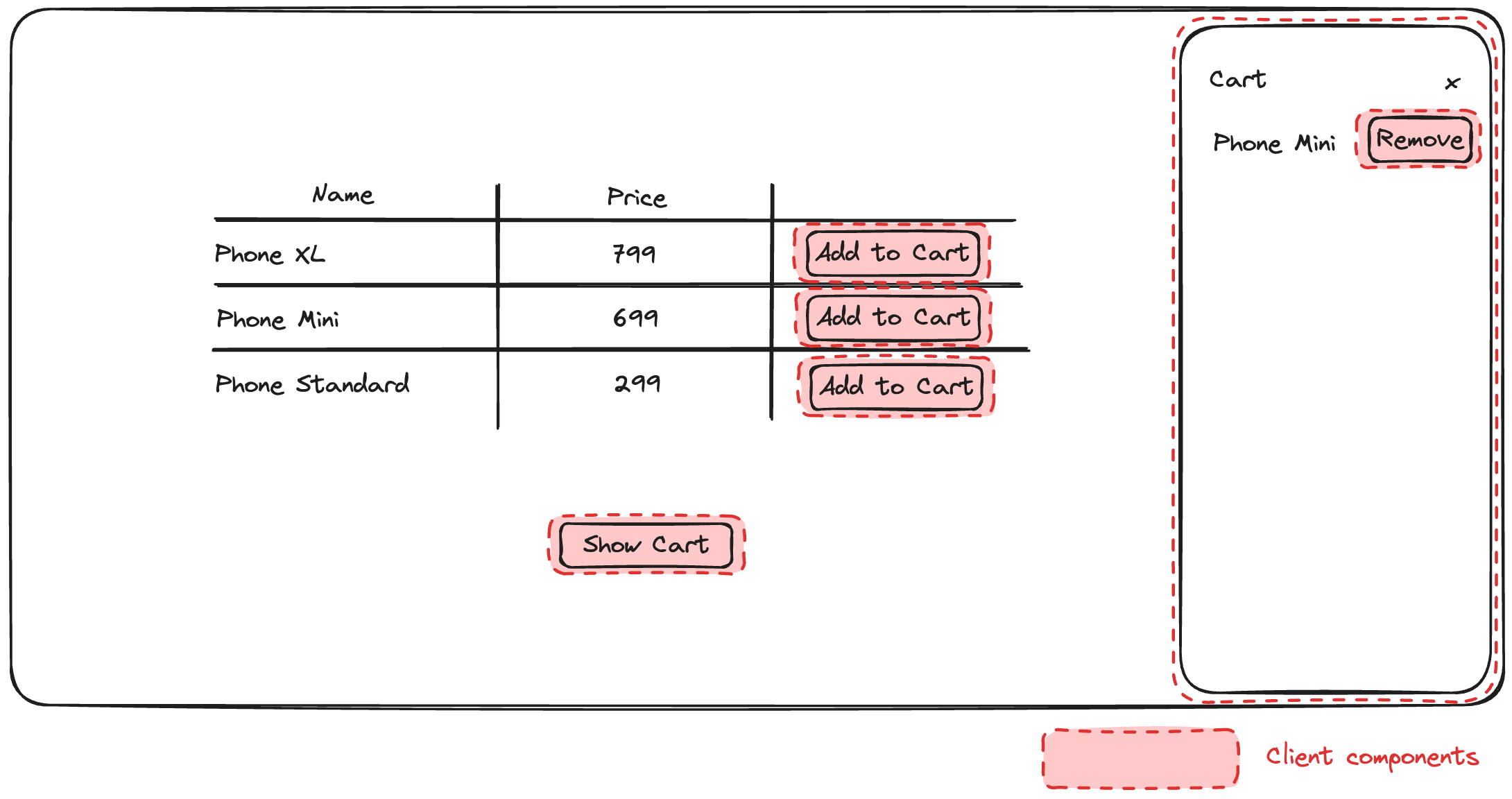
Cart design concept

This can be accomplished by the nature of client components that can accept server-rendered content. We'll set up a React context provider at the layout level, which will control showing or hiding the cart. This provider will be used by our client components (the "Add to Cart" button and the "Show Cart" button), as well as by the drawer wrapper.

When you click "Add to Cart," this will invoke a server action (more on that later), and then use a function provided through the context of the provider to show the drawer.

The Code

For this example, we'll use shadcn as our component library. It looks nice, and it also provides a good, accessible component for our cart drawer. Looking at our wireframe above, we'll need a total of three components:

The components can be installed with a single command:

npx shadcn-ui@latest button table sheet

Next, we'll set up our React context provider:

// app/layout.tsx
export default function RootLayout({
  children,
}: Readonly<{
  children: React.ReactNode;
}>) {
  return (
    <html lang="en">
      <CartProvider>
        <body
          className={cn(
            "min-h-screen bg-background font-sans antialiased",
            fontSans.variable,
          )}
        >
          {children}
        </body>
      </CartProvider>
    </html>
  );
}
// app/components/cart-provider.tsx
"use client";

import { createContext, useState } from "react";

type CartProviderContextValue = {
  isCartShown: boolean;
  setCartShown: (isCartShown: boolean) => void;
};

export const CartContext = createContext<CartProviderContextValue>({
  isCartShown: false,
  setCartShown: () => {},
});

export interface CartProviderProps {
  children?: React.ReactNode;
}

export default function CartProvider({ children }: CartProviderProps) {
  const [isShown, setShown] = useState(false);

  return (
    <CartContext.Provider
      value={{
        isCartShown: isShown,
        setCartShown: setShown,
      }}
    >
      {children}
    </CartContext.Provider>
  );
}

The provider provides a boolean flag to indicate whether the cart is currently shown (isCartShown) and a function to change that (setCartShown). Note that CartProvider is a client component, but its contents are provided as children. Therefore, CartProvider is just a thin client-component wrapper around its contents.

Now, let's see the implementation of the "Add to Cart" button and the CartDrawer component. The AddToCartButton is a client component that reads the React context and calls its setCartShown function after adding to the cart has been completed. This will, in turn, set the isCartShown flag on the provider and show the cart drawer, which also reads the isCartShown flag from the provider. How is the cart updated, though? We'll use a server action named addToCartAction for that. We'll explain how this works in a bit, but in the meantime, let's see the implementations of the AddToCart button and the CartDrawer component.

// app/components/add-to-cart-button.tsx
"use client";

import { addToCartAction } from "@/app/actions/cart";
import { Button } from "@/app/components/ui/button";
import { useContext } from "react";
import { CartContext } from "@/app/components/cart-provider";

export type AddToCartButtonProps = {
  productId: number;
};

export default function AddToCartButton({ productId }: AddToCartButtonProps) {
  const { setCartShown } = useContext(CartContext);

  const handleAddToCart = async () => {
    await addToCartAction(productId);
    setCartShown(true);
  };

  return <Button onClick={handleAddToCart}>Add to Cart</Button>;
}

Similar to the CartProvider component, the' CartDrawer' component is a thin client component wrapper around its contents. It reads the React context provided by the CartProvider and passes it to the Sheet component from the Shadcn library. The SheetContent component accepts cart contents as children passed from the CartDrawer's parent, which is server-rendered.

// app/components/cart-drawer.tsx
"use client";

import {
  Sheet,
  SheetContent,
  SheetHeader,
  SheetTitle,
} from "@/app/components/ui/sheet";
import { useContext } from "react";
import { CartContext } from "@/app/components/cart-provider";

type CartDrawerProps = {
  children: React.ReactNode;
};

export default function CartDrawer({ children }: CartDrawerProps) {
  const { isCartShown, setCartShown } = useContext(CartContext);

  return (
    <Sheet open={isCartShown} onOpenChange={setCartShown}>
      <SheetContent>
        <SheetHeader>
          <SheetTitle>Cart</SheetTitle>
        </SheetHeader>
        {children}
      </SheetContent>
    </Sheet>
  );
}

Using Server Actions and Cache Invalidation

But how do we ensure that the contents are updated? The contents are an RSC component called CartContents that calls getCachedCart in the data access layer. In real-world scenarios, getCachedCart would probably call a database or an API, but we have neither here. So, we'll simulate a database through the use of the file-system-db package, a lightweight Node library that can write and read to a JSON file as a database.

The get calls to the database are wrapped in unstable_cache, which allows us to tag such requests with cart. This means CartContents is initially fetching data from the tagged getCachedCart call.

// app/data-access/cart.ts

export const getCachedCart = unstable_cache(
  async () => {
    return await getCart();
  },
  ["getCart"],
  { tags: ["cart"] },
);

export function getCart(): Promise<Cart> {
  return Promise.resolve(db.get("cart"));
}

Whenever we mutate the cart, we want to call invalidateTags("cart"). This will force purging of Next.js caches and consequently re-render the cart. For example, the "Add to Cart" button calls the addToCartAction server action, which adds the item to the database and calls invalidateTags("cart"). This server action call returns an updated RSC payload to the client, which re-renders the part that depended on the getCachedCart call - and that is the CartContents component.

// app/actions/cart.ts

export async function addToCartAction(productId: number) {
  await addToCart(productId);
  // Adding the following revalidates the data cache and makes this server action return updated RSC data, which the client part re-renders
  revalidateTag("cart");
}
// app/data-access/cart.ts
export async function addToCart(productId: number) {
  const product = PRODUCTS.find((product) => product.id === productId);
  if (product) {
    const cart = await getCart();
    cart.items.push(product);
    await db.set("cart", cart);
  }

  return Promise.resolve();
}

And that's it. We now have a fully functional, mostly server-rendered cart, where only small bits of interactivity are modeled as client components. Here is the result:
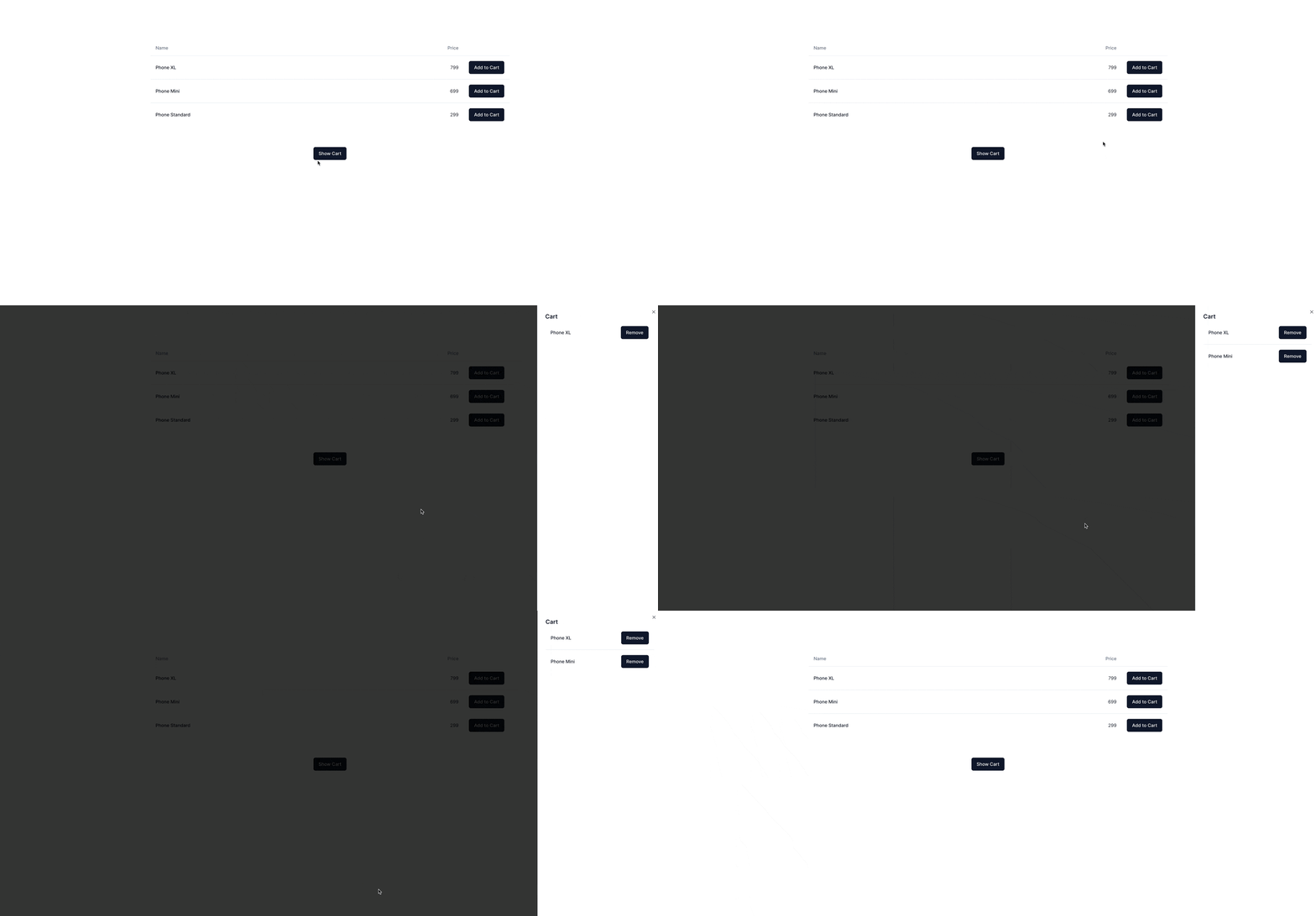
Animation showing cart in action

Some of the code shown above remains, such as the "Show Cart" button and the table of products, but those are just UX improvements on top of the core functionality. You can see the entire source code on Stackblitz.

Wrapping Up

In this blog post, we've explored how to maximize server rendering in Next.js while still having an interactive application. By leveraging React Server Components, client components, and server actions, we've created a shopping experience where most of the page is server-rendered, but the cart drawer is interactive and updates in real time. This approach improves performance, reduces the client-side rendering burden, and delivers smaller bundles to the client.

This Dot is a consultancy dedicated to guiding companies through their modernization and digital transformation journeys. Specializing in replatforming, modernizing, and launching new initiatives, we stand out by taking true ownership of your engineering projects.

We love helping teams with projects that have missed their deadlines or helping keep your strategic digital initiatives on course. Check out our case studies and our clients that trust us with their engineering.

You might also like

Next.js + MongoDB Connection Storming cover image

Next.js + MongoDB Connection Storming

Building a Next.js application connected to MongoDB can feel like a match made in heaven. MongoDB stores all of its data as JSON objects, which don’t require transformation into JavaScript objects like relational SQL data does. However, when deploying your application to a serverless production environment such as Vercel, it is crucial to manage your database connections properly. If you encounter errors like these, you may be experiencing Connection Storming: * MongoServerSelectionError: connect ECONNREFUSED &lt;IP_ADDRESS>:&lt;PORT> * MongoNetworkError: failed to connect to server [&lt;hostname>:&lt;port>] on first connect * MongoTimeoutError: Server selection timed out after &lt;x> ms * MongoTopologyClosedError: Topology is closed, please connect * Mongo Atlas: Connections % of configured limit has gone above 80 Connection storming occurs when your application has to mount a connection to Mongo for every serverless function or API endpoint call. Vercel executes your application’s code in a highly concurrent and isolated fashion. So, if you create new database connections on each request, your app might quickly exceed the connection limit of your database. We can leverage Vercel’s fluid compute model to keep our database connection objects warm across function invocations. Traditional serverless architecture was designed for quick, stateless web app transactions. Now, especially with the rise of LLM-oriented applications built with Next.js, interactions with applications are becoming more sequential. We just need to ensure that we assign our MongoDB connection to a global variable. Protip: Use global variables Vercel’s fluid compute model means all memory, including global constants like a MongoDB client, stays initialized between requests as long as the instance remains active. By assigning your MongoDB client to a global constant, you avoid redundant setup work and reduce the overhead of cold starts. This enables a more efficient approach to reusing connections for your application’s MongoDB client. The example below demonstrates how to retrieve an array of users from the users collection in MongoDB and either return them through an API request to /api/users or render them as an HTML list at the /users route. To support this, we initialize a global clientPromise variable that maintains the MongoDB connection across warm serverless executions, avoiding re-initialization on every request. ` Using this database connection in your API route code is easy: ` You can also use this database connection in your server-side rendered React components. ` In serverless environments like Vercel, managing database connections efficiently is key to avoiding connection storming. By reusing global variables and understanding the serverless execution model, you can ensure your Next.js app remains stable and performant....

Vercel & React Native - A New Era of Mobile Development? cover image

Vercel & React Native - A New Era of Mobile Development?

Vercel & React Native - A New Era of Mobile Development? Jared Palmer of Vercel recently announced an acquisition that spiked our interest. Having worked extensively with both Next.js and Vercel, as well as React Native, we were curious to see what the appointment of Fernando Rojo, the creator of Solito, as Vercel's Head of Mobile, would mean for the future of React Native and Vercel. While we can only speculate on what the future holds, we can look closer at Solito and its current integration with Vercel. Based on the information available, we can also make some educated guesses about what the future might hold for React Native and Vercel. What is Solito? Based on a recent tweet by Guillermo Rauch, one might assume that Solito allows you to build mobile apps with Next.js. While that might become a reality in the future, Jamon Holmgren, the CTO of Infinite Red, added some context to the conversation. According to Jamon, Solito is a cross-platform framework built on top of two existing technologies: - For the web, Solito leverages Next.js. - For mobile, Solito takes advantage of Expo. That means that, at the moment, you can't build mobile apps using Next.js & Solito only - you still need Expo and React Native. Even Jamon, however, admits that even the current integration of Solito with Vercel is exciting. Let's take a closer look at what Solito is according to its official website: > This library is two things: > > 1. A tiny wrapper around React Navigation and Next.js that lets you share navigation code across platforms. > > 2. A set of patterns and examples for building cross-platform apps with React Native + Next.js. We can see that Jamon was right - Solito allows you to share navigation code between Next.js and React Native and provides some patterns and components that you can use to build cross-platform apps, but it doesn't replace React Native or Expo. The Cross-Platformness of Solito So, we know Solito provides a way to share navigation and some patterns between Next.js and React Native. But what precisely does that entail? Cross-Platform Hooks and Components If you look at Solito's documentation, you'll see that it's not only navigation you can share between Next.js and React Native. There are a few components that wrap Next.js components and make them available in React Native: - Link - a component that wraps Next.js' Link component and allows you to navigate between screens in React Native. - TextLink - a component that also wraps Next.js' Link component but accepts text nodes as children. - MotiLink - a component that wraps Next.js' Link component and allows you to animate the link using moti, a popular animation library for React Native. - SolitoImage - a component that wraps Next.js' Image component and allows you to display images in React Native. On top of that, Solito provides a few hooks that you can use for shared routing and navigation: - useRouter() - a hook that lets you navigate between screens across platforms using URLs and Next.js Url objects. - useLink() - a hook that lets you create Link components across the two platforms. - createParam() - a function that returns the useParam() and useParams() hooks which allow you to access and update URL parameters across platforms. Shared Logic The Solito starter project is structured as a monorepo containing: - apps/next - the Next.js application. - apps/expo or apps/native - the React Native application. - packages/app - shared packages across the two applications: - features - providers - navigation The shared packages contain the shared logic and components you can use across the two platforms. For example, the features package contains the shared components organized by feature, the providers package contains the shared context providers, and the navigation package includes the shared navigation logic. One of the key principles of Solito is gradual adoption, meaning that if you use Solito and follow the recommended structure and patterns, you can start with a Next.js application only and eventually add a React Native application to the mix. Deployments Deploying the Next.js application built on Solito is as easy as deploying any other Next.js application. You can deploy it to Vercel like any other Next.js application, e.g., by linking your GitHub repository to Vercel and setting up automatic deployments. Deploying the React Native application built on top of Solito to Expo is a little bit more involved - you cannot directly use the Github Action recommended by Expo without some modification as Solito uses a monorepo structure. The adjustment, however, is luckily just a one-liner. You just need to add the working-directory parameter to the eas update --auto command in the Github Action. Here's what the modified part of the Expo Github Action would look like: ` What Does the Future Hold? While we can't predict the future, we can make some educated guesses about what the future might hold for Solito, React Native, Expo, and Vercel, given what we know about the current state of Solito and the recent acquisition of Fernando Rojo by Vercel. A Competitor to Expo? One question that comes to mind is whether Vercel will work towards creating a competitor to Expo. While it's too early to tell, it's not entirely out of the question. Vercel has been expanding its offering beyond Next.js and static sites, and it's not hard to imagine that it might want to provide a more integrated, frictionless solution for building mobile apps, further bridging the gap between web and mobile development. However, Expo is a mature and well-established platform, and building a mobile app toolchain from scratch is no trivial task. It would be easier for Vercel to build on top of Expo and partner with them to provide a more integrated solution for building mobile apps with Next.js. Furthermore, we need to consider Vercel's target audience. Most of Vercel's customers are focused on web development with Next.js, and switching to a mobile-first approach might not be in their best interest. That being said, Vercel has been expanding its offering to cater to a broader audience, and providing a more integrated solution for building mobile apps might be a step in that direction. A Cross-Platform Framework for Mobile Apps with Next.js? Imagine a future where you write your entire application in Next.js — using its routing, file structure, and dev tools — and still produce native mobile apps for iOS and Android. It's unlikely such functionality would be built from scratch. It would likely still rely on React Native + Expo to handle the actual native modules, build processes, and distribution. From the developer’s point of view, however, it would still feel like writing Next.js. While this idea sounds exciting, it's not likely to happen in the near future. Building a cross-platform framework that allows you to build mobile apps with Next.js only would require a lot of work and coordination between Vercel, Expo, and the React Native community. Furthermore, there are some conceptual differences between Next.js and React Native that would need to be addressed, such as Next.js being primarily SSR-oriented and native mobile apps running on the client. Vercel Building on Top of Solito? One of the more likely scenarios is that Vercel will build on top of Solito to provide a more integrated solution for building mobile apps with Next.js. This could involve providing more components, hooks, and patterns for building cross-platform apps, as well as improving the deployment process for React Native applications built on top of Solito. A potential partnership between Vercel and Expo, or at least some kind of closer integration, could also be in the cards in this scenario. While Expo already provides a robust infrastructure for building mobile apps, Vercel could provide complementary services or features that make it easier to build mobile apps on top of Solito. Conclusion Some news regarding Vercel and mobile development is very likely on the horizon. After all, Guillermo Rauch, the CEO of Vercel, has himself stated that Vercel will keep raising the quality bar of the mobile and web ecosystems. While it's unlikely we'll see a full-fledged mobile app framework built on top of Next.js or a direct competitor to Expo in the near future, it's not hard to imagine that Vercel will provide more tools and services for building mobile apps with Next.js. Solito is a step in that direction, and it's exciting to see what the future holds for mobile development with Vercel....

The 2025 Guide to JS Build Tools cover image

The 2025 Guide to JS Build Tools

The 2025 Guide to JS Build Tools In 2025, we're seeing the largest number of JavaScript build tools being actively maintained and used in history. Over the past few years, we've seen the trend of many build tools being rewritten or forked to use a faster and more efficient language like Rust and Go. In the last year, new companies have emerged, even with venture capital funding, with the goal of working on specific sets of build tools. Void Zero is one such recent example. With so many build tools around, it can be difficult to get your head around and understand which one is for what. Hopefully, with this blog post, things will become a bit clearer. But first, let's explain some concepts. Concepts When it comes to build tools, there is no one-size-fits-all solution. Each tool typically focuses on one or two primary features, and often relies on other tools as dependencies to accomplish more. While it might be difficult to explain here all of the possible functionalities a build tool might have, we've attempted to explain some of the most common ones so that you can easily understand how tools compare. Minification The concept of minification has been in the JavaScript ecosystem for a long time, and not without reason. JavaScript is typically delivered from the server to the user's browser through a network whose speed can vary. Thus, there was a need very early in the web development era to compress the source code as much as possible while still making it executable by the browser. This is done through the process of *minification*, which removes unnecessary whitespace, comments, and uses shorter variable names, reducing the total size of the file. This is what an unminified JavaScript looks like: ` This is the same file, minified: ` Closely related to minimizing is the concept of source maps#Source_mapping), which goes hand in hand with minimizing - source maps are essentially mappings between the minified file and the original source code. Why is that needed? Well, primarily for debugging minified code. Without source maps, understanding errors in minified code is nearly impossible because variable names are shortened, and all formatting is removed. With source maps, browser developer tools can help you debug minified code. Tree-Shaking *Tree-shaking* was the next-level upgrade from minification that became possible when ES modules were introduced into the JavaScript language. While a minified file is smaller than the original source code, it can still get quite large for larger apps, especially if it contains parts that are effectively not used. Tree shaking helps eliminate this by performing a static analysis of all your code, building a dependency graph of the modules and how they relate to each other, which allows the bundler to determine which exports are used and which are not. Once unused exports are found, the build tool will remove them entirely. This is also called *dead code elimination*. Bundling Development in JavaScript and TypeScript rarely involves a single file. Typically, we're talking about tens or hundreds of files, each containing a specific part of the application. If we were to deliver all those files to the browser, we would overwhelm both the browser and the network with many small requests. *Bundling* is the process of combining multiple JS/TS files (and often other assets like CSS, images, etc.) into one or more larger files. A bundler will typically start with an entry file and then recursively include every module or file that the entry file depends on, before outputting one or more files containing all the necessary code to deliver to the browser. As you might expect, a bundler will typically also involve minification and tree-shaking, as explained previously, in the process to deliver only the minimum amount of code necessary for the app to function. Transpiling Once TypeScript arrived on the scene, it became necessary to translate it to JavaScript, as browsers did not natively understand TypeScript. Generally speaking, the purpose of a *transpiler* is to transform one language into another. In the JavaScript ecosystem, it's most often used to transpile TypeScript code to JavaScript, optionally targeting a specific version of JavaScript that's supported by older browsers. However, it can also be used to transpile newer JavaScript to older versions. For example, arrow functions, which are specified in ES6, are converted into regular function declarations if the target language is ES5. Additionally, a transpiler can also be used by modern frameworks such as React to transpile JSX syntax (used in React) into plain JavaScript. Typically, with transpilers, the goal is to maintain similar abstractions in the target code. For example, transpiling TypeScript into JavaScript might preserve constructs like loops, conditionals, or function declarations that look natural in both languages. Compiling While a transpiler's purpose is to transform from one language to another without or with little optimization, the purpose of a *compiler* is to perform more extensive transformations and optimizations, or translate code from a high-level programming language into a lower-level one such as bytecode. The focus here is on optimizing for performance or resource efficiency. Unlike transpiling, compiling will often transform abstractions so that they suit the low-level representation, which can then run faster. Hot-Module Reloading (HMR) *Hot-module reloading* (HMR) is an important feature of modern build tools that drastically improves the developer experience while developing apps. In the early days of the web, whenever you'd make a change in your source code, you would need to hit that refresh button on the browser to see the change. This would become quite tedious over time, especially because with a full-page reload, you lose all the application state, such as the state of form inputs or other UI components. With HMR, we can update modules in real-time without requiring a full-page reload, speeding up the feedback loop for any changes made by developers. Not only that, but the full application state is typically preserved, making it easier to test and iterate on code. Development Server When developing web applications, you need to have a locally running development server set up on something like http://localhost:3000. A development server typically serves unminified code to the browser, allowing you to easily debug your application. Additionally, a development server will typically have hot module replacement (HMR) so that you can see the results on the browser as you are developing your application. The Tools Now that you understand the most important features of build tools, let's take a closer look at some of the popular tools available. This is by no means a complete list, as there have been many build tools in the past that were effective and popular at the time. However, here we will focus on those used by the current popular frameworks. In the table below, you can see an overview of all the tools we'll cover, along with the features they primarily focus on and those they support secondarily or through plugins. The tools are presented in alphabetical order below. Babel Babel, which celebrated its 10th anniversary since its initial release last year, is primarily a JavaScript transpiler used to convert modern JavaScript (ES6+) into backward-compatible JavaScript code that can run on older JavaScript engines. Traditionally, developers have used it to take advantage of the newer features of the JavaScript language without worrying about whether their code would run on older browsers. esbuild esbuild, created by Evan Wallace, the co-founder and former CTO of Figma, is primarily a bundler that advertises itself as being one of the fastest bundlers in the market. Unlike all the other tools on this list, esbuild is written in Go. When it was first released, it was unusual for a JavaScript bundler to be written in a language other than JavaScript. However, this choice has provided significant performance benefits. esbuild supports ESM and CommonJS modules, as well as CSS, TypeScript, and JSX. Unlike traditional bundlers, esbuild creates a separate bundle for each entry point file. Nowadays, it is used by tools like Vite and frameworks such as Angular. Metro Unlike other build tools mentioned here, which are mostly web-focused, Metro's primary focus is React Native. It has been specifically optimized for bundling, transforming, and serving JavaScript and assets for React Native apps. Internally, it utilizes Babel as part of its transformation process. Metro is sponsored by Meta and actively maintained by the Meta team. Oxc The JavaScript Oxidation Compiler, or Oxc, is a collection of Rust-based tools. Although it is referred to as a compiler, it is essentially a toolchain that includes a parser, linter, formatter, transpiler, minifier, and resolver. Oxc is sponsored by Void Zero and is set to become the backbone of other Void Zero tools, like Vite. Parcel Feature-wise, Parcel covers a lot of ground (no pun intended). Largely created by Devon Govett, it is designed as a zero-configuration build tool that supports bundling, minification, tree-shaking, transpiling, compiling, HMR, and a development server. It can utilize all the necessary types of assets you will need, from JavaScript to HTML, CSS, and images. The core part of it is mostly written in JavaScript, with a CSS transformer written in Rust, whereas it delegates the JavaScript compilation to a SWC. Likewise, it also has a large collection of community-maintained plugins. Overall, it is a good tool for quick development without requiring extensive configuration. Rolldown Rolldown is the future bundler for Vite, written in Rust and built on top of Oxc, currently leveraging its parser and resolver. Inspired by Rollup (hence the name), it will provide Rollup-compatible APIs and plugin interface, but it will be more similar to esbuild in scope. Currently, it is still in heavy development and it is not ready for production, but we should definitely be hearing more about this bundler in 2025 and beyond. Rollup Rollup is the current bundler for Vite. Originally created by Rich Harris, the creator of Svelte, Rollup is slowly becoming a veteran (speaking in JavaScript years) compared to other build tools here. When it originally launched, it introduced novel ideas focused on ES modules and tree-shaking, at the time when Webpack as its competitor was becoming too complex due to its extensive feature set - Rollup promised a simpler way with a straightforward configuration process that is easy to understand. Rolldown, mentioned previously, is hoped to become a replacement for Rollup at some point. Rsbuild Rsbuild is a high-performance build tool written in Rust and built on top of Rspack. Feature-wise, it has many similiarities with Vite. Both Rsbuild and Rspack are sponsored by the Web Infrastructure Team at ByteDance, which is a division of ByteDance, the parent company of TikTok. Rsbuild is built as a high-level tool on top of Rspack that has many additional features that Rspack itself doesn't provide, such as a better development server, image compression, and type checking. Rspack Rspack, as the name suggests, is a Rust-based alternative to Webpack. It offers a Webpack-compatible API, which is helpful if you are familiar with setting up Webpack configurations. However, if you are not, it might have a steep learning curve. To address this, the same team that built Rspack also developed Rsbuild, which helps you achieve a lot with out-of-the-box configuration. Under the hood, Rspack uses SWC for compiling and transpiling. Feature-wise, it’s quite robust. It includes built-in support for TypeScript, JSX, Sass, Less, CSS modules, Wasm, and more, as well as features like module federation, PostCSS, Lightning CSS, and others. Snowpack Snowpack was created around the same time as Vite, with both aiming to address similar needs in modern web development. Their primary focus was on faster build times and leveraging ES modules. Both Snowpack and Vite introduced a novel idea at the time: instead of bundling files while running a local development server, like traditional bundlers, they served the app unbundled. Each file was built only once and then cached indefinitely. When a file changed, only that specific file was rebuilt. For production builds, Snowpack relied on external bundlers such as Webpack, Rollup, or esbuild. Unfortunately, Snowpack is a tool you’re likely to hear less and less about in the future. It is no longer actively developed, and Vite has become the recommended alternative. SWC SWC, which stands for Speedy Web Compiler, can be used for both compilation and bundling (with the help of SWCpack), although compilation is its primary feature. And it really is speedy, thanks to being written in Rust, as are many other tools on this list. Primarily advertised as an alternative to Babel, its SWC is roughly 20x faster than Babel on a single thread. SWC compiles TypeScript to JavaScript, JSX to JavaScript, and more. It is used by tools such as Parcel and Rspack and by frameworks such as Next.js, which are used for transpiling and minification. SWCpack is the bundling part of SWC. However, active development within the SWC ecosystem is not currently a priority. The main author of SWC now works for Turbopack by Vercel, and the documentation states that SWCpack is presently not in active development. Terser Terser has the smallest scope compared to other tools from this list, but considering that it's used in many of those tools, it's worth separating it into its own section. Terser's primary role is minification. It is the successor to the older UglifyJS, but with better performance and ES6+ support. Vite Vite is a somewhat of a special beast. It's primarily a development server, but calling it just that would be an understatement, as it combines the features of a fast development server with modern build capabilities. Vite shines in different ways depending on how it's used. During development, it provides a fast server that doesn't bundle code like traditional bundlers (e.g., Webpack). Instead, it uses native ES modules, serving them directly to the browser. Since the code isn't bundled, Vite also delivers fast HMR, so any updates you make are nearly instant. Vite uses two bundlers under the hood. During development, it uses esbuild, which also allows it to act as a TypeScript transpiler. For each file you work on, it creates a file for the browser, allowing an easy separation between files which helps HMR. For production, it uses Rollup, which generates a single file for the browser. However, Rollup is not as fast as esbuild, so production builds can be a bit slower than you might expect. (This is why Rollup is being rewritten in Rust as Rolldown. Once complete, you'll have the same bundler for both development and production.) Traditionally, Vite has been used for client-side apps, but with the new Environment API released in Vite 6.0, it bridges the gap between client-side and server-rendered apps. Turbopack Turbopack is a bundler, written in Rust by the creators of webpack and Next.js at Vercel. The idea behind Turbopack was to do a complete rewrite of Webpack from scratch and try to keep a Webpack compatible API as much as possible. This is not an easy feat, and this task is still not over. The enormous popularity of Next.js is also helping Turbopack gain traction in the developer community. Right now, Turbopack is being used as an opt-in feature in Next.js's dev server. Production builds are not yet supported but are planned for future releases. Webpack And finally we arrive at Webpack, the legend among bundlers which has had a dominant position as the primary bundler for a long time. Despite the fact that there are so many alternatives to Webpack now (as we've seen in this blog post), it is still widely used, and some modern frameworks such as Next.js still have it as a default bundler. Initially released back in 2012, its development is still going strong. Its primary features are bundling, code splitting, and HMR, but other features are available as well thanks to its popular plugin system. Configuring Webpack has traditionally been challenging, and since it's written in JavaScript rather than a lower-level language like Rust, its performance lags behind compared to newer tools. As a result, many developers are gradually moving away from it. Conclusion With so many build tools in today's JavaScript ecosystem, many of which are similarly named, it's easy to get lost. Hopefully, this blog post was a useful overview of the tools that are most likely to continue being relevant in 2025. Although, with the speed of development, it may as well be that we will be seeing a completely different picture in 2026!...

The simplicity of deploying an MCP server on Vercel cover image

The simplicity of deploying an MCP server on Vercel

The current Model Context Protocol (MCP) spec is shifting developers toward lightweight, stateless servers that serve as tool providers for LLM agents. These MCP servers communicate over HTTP, with OAuth handled clientside. Vercel’s infrastructure makes it easy to iterate quickly and ship agentic AI tools without overhead. Example of Lightweight MCP Server Design At This Dot Labs, we built an MCP server that leverages the DocuSign Navigator API. The tools, like `get_agreements`, make a request to the DocuSign API to fetch data and then respond in an LLM-friendly way. ` Before the MCP can request anything, it needs to guide the client on how to kick off OAuth. This involves providing some MCP spec metadata API endpoints that include necessary information about where to obtain authorization tokens and what resources it can access. By understanding these details, the client can seamlessly initiate the OAuth process, ensuring secure and efficient data access. The Oauth flow begins when the user's LLM client makes a request without a valid auth token. In this case they’ll get a 401 response from our server with a WWW-Authenticate header, and then the client will leverage the metadata we exposed to discover the authorization server. Next, the OAuth flow kicks off directly with Docusign as directed by the metadata. Once the client has the token, it passes it in the Authorization header for tool requests to the API. ` This minimal set of API routes enables me to fetch Docusign Navigator data using natural language in my agent chat interface. Deployment Options I deployed this MCP server two different ways: as a Fastify backend and then by Vercel functions. Seeing how simple my Fastify MCP server was, and not really having a plan for deployment yet, I was eager to rewrite it for Vercel. The case for Vercel: * My own familiarity with Next.js API deployment * Fit for architecture * The extremely simple deployment process * Deploy previews (the eternal Vercel customer conversion feature, IMO) Previews of unfamiliar territory Did you know that the MCP spec doesn’t “just work” for use as ChatGPT tooling? Neither did I, and I had to experiment to prove out requirements that I was unfamiliar with. Part of moving fast for me was just deploying Vercel previews right out of the CLI so I could test my API as a Connector in ChatGPT. This was a great workflow for me, and invaluable for the team in code review. Stuff I’m Not Worried About Vercel’s mcp-handler package made setup effortless by abstracting away some of the complexity of implementing the MCP server. It gives you a drop-in way to define tools, setup https-streaming, and handle Oauth. By building on Vercel’s ecosystem, I can focus entirely on shipping my product without worrying about deployment, scaling, or server management. Everything just works. ` A Brief Case for MCP on Next.js Building an API without Next.js on Vercel is straightforward. Though, I’d be happy deploying this as a Next.js app, with the frontend features serving as the documentation, or the tools being a part of your website's agentic capabilities. Overall, this lowers the barrier to building any MCP you want for yourself, and I think that’s cool. Conclusion I'll avoid quoting Vercel documentation in this post. AI tooling is a critical component of this natural language UI, and we just want to ship. I declare Vercel is excellent for stateless MCP servers served over http....

Let's innovate together!

We're ready to be your trusted technical partners in your digital innovation journey.

Whether it's modernization or custom software solutions, our team of experts can guide you through best practices and how to build scalable, performant software that lasts.

Prefer email? hi@thisdot.co