
Skip to content

Introducing the new Expo, Styled Components, and Zustand Starter Kit

This article was written over 18 months ago and may contain information that is out of date. Some content may be relevant but please refer to the relevant official documentation or available resources for the latest information.

Intro

image

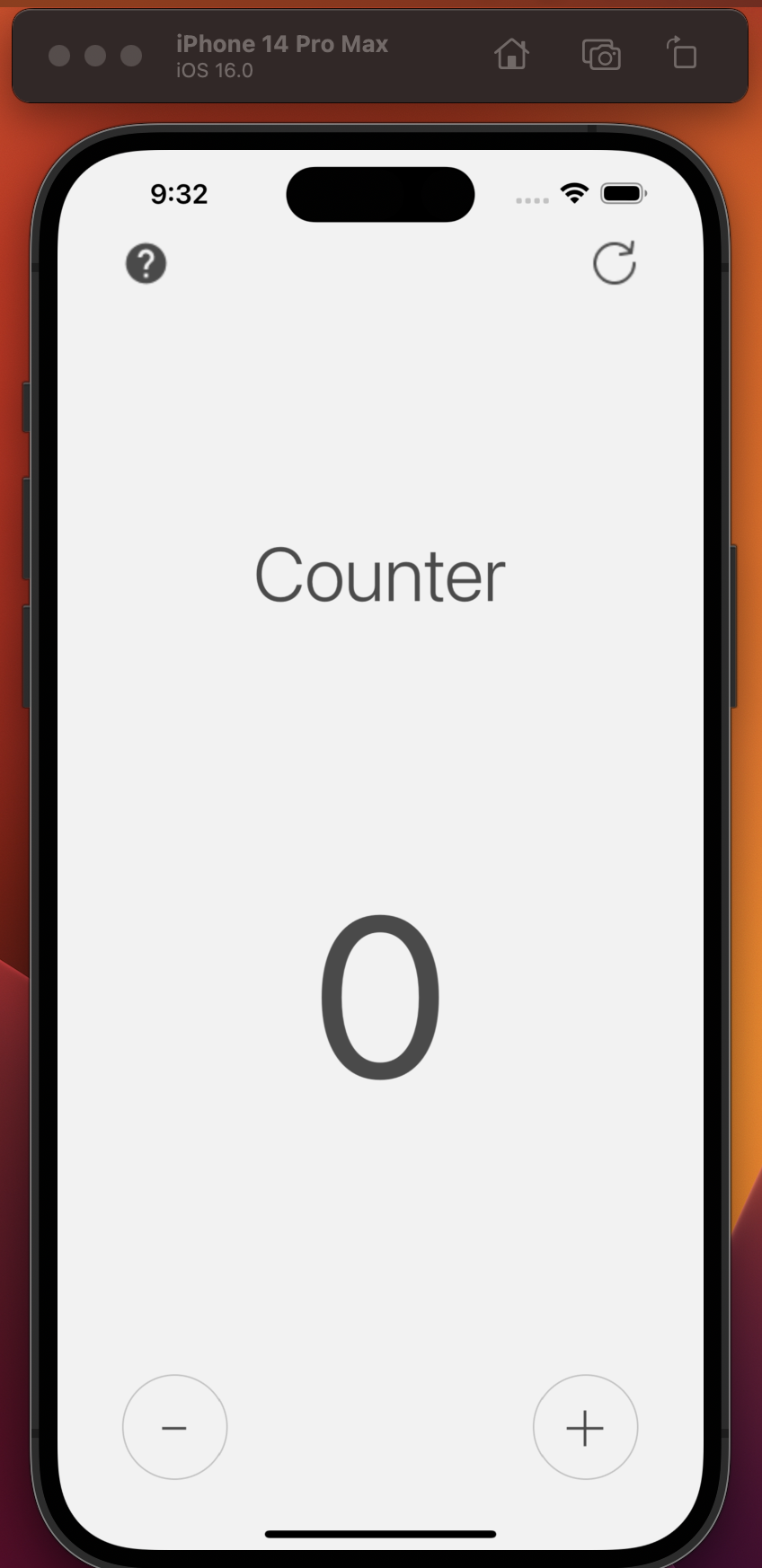
We are delighted to announce our brand new Expo React Native starter kit to our Starter.dev kits collection. We built this starter kit to enable our team members who work mostly with web technologies to make an easy transition for them to work on native mobile apps with their current knowledge without any extra effort.

This Starter kit contains:

  • Expo a React native wrapper.
  • Styled Components lets you write actual CSS in your JavaScript-like web.
  • Zustand A small, fast, and scalable barebones state-management solution.
  • TypeScript JavaScript with syntax for types.
  • Jest is a delightful JavaScript Testing Framework with a focus on simplicity.
  • React Navigation Routing and navigation for Expo and React Native apps.

Problems This Kit Addresses

React Native Styling

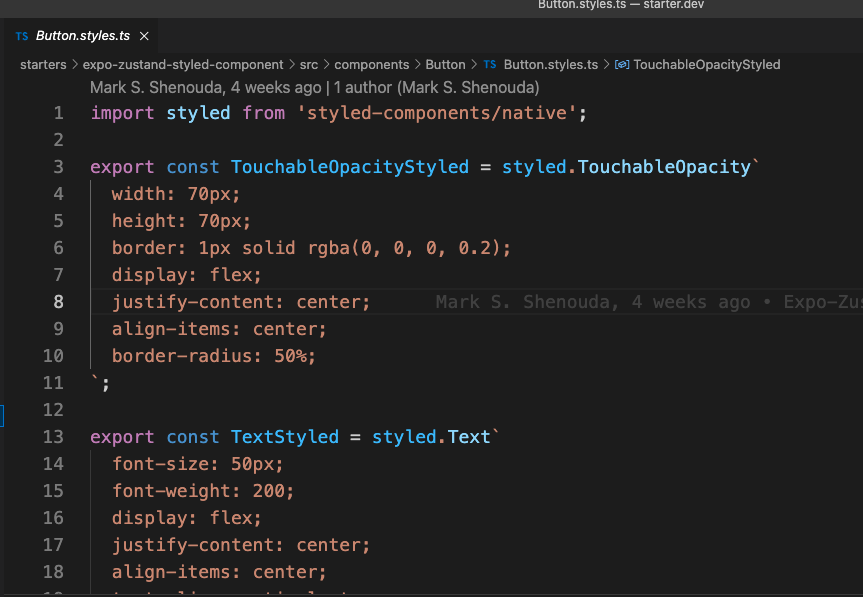
One of the most difficult things for React Native beginners is its styling system. It's difficult for people who come from a web background because it’s not similar to CSS at all. It has different units, and each property accepts a different value. For more information visit React Native Style Documentation styled-components/native fixed that problem, you literally write CSS like for web and it translates the CSS code to a React Native Styles without any extra effort.
image

Share Components Across Platforms

Thanks to the Expo team, we can use the React Native components cross-platform, even with frameworks like Next.js. This saves teams a lot of work. Instead of building the same feature twice, one for the web and the other for the mobile apps, we only build it once.

Let me show you an example:

A lot of libraries in the React ecosystem use the setImmediate() API (like react-native-reanimated). It’s a method used to break up long-running operations, and run a callback function immediately after the browser has completed other operations such as events and display updates, which Next.js doesn't polyfill by default. To fix this, you can polyfill it yourself.

First, we need to install set immediate package

yarn add setimmediate

Then import it in the app root pages/_app.js

import 'setimmediate';

Use the @expo/next-adapter in the next.config.js

const { withExpo } = require('@expo/next-adapter');

module.exports = withExpo({
  /* next.config.js code */
});

Add image support with next-images

const { withExpo } = require('@expo/next-adapter');
const withImages = require('next-images');

module.exports = withExpo(
  withImages({
    projectRoot: __dirname,
  })
);

Add font support with next-fonts

const { withExpo } = require('@expo/next-adapter');
const withFonts = require('next-fonts');

module.exports = withExpo(
  withFonts({
    projectRoot: __dirname,
  })
);

Now you can use your Expo React Native components in Next.js site.

Skip the Tedious Steps of Installing React Navigation

We use React Navigation in almost every project we work on, it’s a necessary piece of the app, so we already set it up so you can start your new app quickly.

image

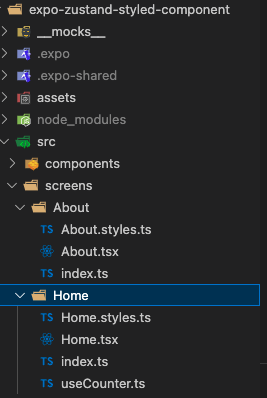
We also grouped the screens under the src/screens directory, where each screen has its own folder with its related files.
image

Defining a better organization pattern for components to scale your app

We structured this project from our experiences with big React projects. One challenging part of using React is that it gives the developer a lot of freedom to choose their own file structure. However this is not good on a bigger app scale, because every developer has their own way to organize the files, and with a big React project that a lot of developers are working on, we usually end up with a mess. We figured this structure out from the previous projects we built.

Imagine we have a component, and this component has different files like, testing, …etc

Our way to structure the components is:

Each component has its own folder:

components/
	FirstComponent/
	SecondComponent/

Each folder has the component files

components/
	FirstComponent/
		FirstComponent.tsx
		FirstComponent.test.tsx
		FirstComponent.stories.tsx

// …etc
	SecondComponent/
		SecondComponent.tsx
		SecondComponent.test.tsx
		SecondComponent.stories.tsx

// …etc

The problem now is the importing sentences gonna be ugly like this:

import FirstComponent from./components/FirstComponent/FirstComponent’;

So it solve this, we add in each Component folder an index.ts file with the following:

export { default } from./FirstComponent’;

Now the folder structure will look like this:

components/
	FirstComponent/
		Index.ts	<- To solve the import sentences 
		FirstComponent.tsx
		FirstComponent.test.tsx
		FirstComponent.stories.tsx

// …etc
	SecondComponent/
		Index.ts	<- To solve the import sentences 
		SecondComponent.tsx
		SecondComponent.test.tsx
		SecondComponent.stories.tsx

// …etc

Now the import sentence will be much cleaner:

import FirstComponent from./components/FirstComponent’

This can help keep your files and folders organized, and help scale your codebase with time.

Conclusion

This starter kit is the result of a lot of experience we gained on React projects we built internally and for clients. It helps you to start quickly without going through the tedious task of installing and setting up dev tools, and at the same time, it helps your app scale more easily.

This Dot is a consultancy dedicated to guiding companies through their modernization and digital transformation journeys. Specializing in replatforming, modernizing, and launching new initiatives, we stand out by taking true ownership of your engineering projects.

We love helping teams with projects that have missed their deadlines or helping keep your strategic digital initiatives on course. Check out our case studies and our clients that trust us with their engineering.

You might also like

Vercel & React Native - A New Era of Mobile Development? cover image

Vercel & React Native - A New Era of Mobile Development?

Vercel & React Native - A New Era of Mobile Development? Jared Palmer of Vercel recently announced an acquisition that spiked our interest. Having worked extensively with both Next.js and Vercel, as well as React Native, we were curious to see what the appointment of Fernando Rojo, the creator of Solito, as Vercel's Head of Mobile, would mean for the future of React Native and Vercel. While we can only speculate on what the future holds, we can look closer at Solito and its current integration with Vercel. Based on the information available, we can also make some educated guesses about what the future might hold for React Native and Vercel. What is Solito? Based on a recent tweet by Guillermo Rauch, one might assume that Solito allows you to build mobile apps with Next.js. While that might become a reality in the future, Jamon Holmgren, the CTO of Infinite Red, added some context to the conversation. According to Jamon, Solito is a cross-platform framework built on top of two existing technologies: - For the web, Solito leverages Next.js. - For mobile, Solito takes advantage of Expo. That means that, at the moment, you can't build mobile apps using Next.js & Solito only - you still need Expo and React Native. Even Jamon, however, admits that even the current integration of Solito with Vercel is exciting. Let's take a closer look at what Solito is according to its official website: > This library is two things: > > 1. A tiny wrapper around React Navigation and Next.js that lets you share navigation code across platforms. > > 2. A set of patterns and examples for building cross-platform apps with React Native + Next.js. We can see that Jamon was right - Solito allows you to share navigation code between Next.js and React Native and provides some patterns and components that you can use to build cross-platform apps, but it doesn't replace React Native or Expo. The Cross-Platformness of Solito So, we know Solito provides a way to share navigation and some patterns between Next.js and React Native. But what precisely does that entail? Cross-Platform Hooks and Components If you look at Solito's documentation, you'll see that it's not only navigation you can share between Next.js and React Native. There are a few components that wrap Next.js components and make them available in React Native: - Link - a component that wraps Next.js' Link component and allows you to navigate between screens in React Native. - TextLink - a component that also wraps Next.js' Link component but accepts text nodes as children. - MotiLink - a component that wraps Next.js' Link component and allows you to animate the link using moti, a popular animation library for React Native. - SolitoImage - a component that wraps Next.js' Image component and allows you to display images in React Native. On top of that, Solito provides a few hooks that you can use for shared routing and navigation: - useRouter() - a hook that lets you navigate between screens across platforms using URLs and Next.js Url objects. - useLink() - a hook that lets you create Link components across the two platforms. - createParam() - a function that returns the useParam() and useParams() hooks which allow you to access and update URL parameters across platforms. Shared Logic The Solito starter project is structured as a monorepo containing: - apps/next - the Next.js application. - apps/expo or apps/native - the React Native application. - packages/app - shared packages across the two applications: - features - providers - navigation The shared packages contain the shared logic and components you can use across the two platforms. For example, the features package contains the shared components organized by feature, the providers package contains the shared context providers, and the navigation package includes the shared navigation logic. One of the key principles of Solito is gradual adoption, meaning that if you use Solito and follow the recommended structure and patterns, you can start with a Next.js application only and eventually add a React Native application to the mix. Deployments Deploying the Next.js application built on Solito is as easy as deploying any other Next.js application. You can deploy it to Vercel like any other Next.js application, e.g., by linking your GitHub repository to Vercel and setting up automatic deployments. Deploying the React Native application built on top of Solito to Expo is a little bit more involved - you cannot directly use the Github Action recommended by Expo without some modification as Solito uses a monorepo structure. The adjustment, however, is luckily just a one-liner. You just need to add the working-directory parameter to the eas update --auto command in the Github Action. Here's what the modified part of the Expo Github Action would look like: ` What Does the Future Hold? While we can't predict the future, we can make some educated guesses about what the future might hold for Solito, React Native, Expo, and Vercel, given what we know about the current state of Solito and the recent acquisition of Fernando Rojo by Vercel. A Competitor to Expo? One question that comes to mind is whether Vercel will work towards creating a competitor to Expo. While it's too early to tell, it's not entirely out of the question. Vercel has been expanding its offering beyond Next.js and static sites, and it's not hard to imagine that it might want to provide a more integrated, frictionless solution for building mobile apps, further bridging the gap between web and mobile development. However, Expo is a mature and well-established platform, and building a mobile app toolchain from scratch is no trivial task. It would be easier for Vercel to build on top of Expo and partner with them to provide a more integrated solution for building mobile apps with Next.js. Furthermore, we need to consider Vercel's target audience. Most of Vercel's customers are focused on web development with Next.js, and switching to a mobile-first approach might not be in their best interest. That being said, Vercel has been expanding its offering to cater to a broader audience, and providing a more integrated solution for building mobile apps might be a step in that direction. A Cross-Platform Framework for Mobile Apps with Next.js? Imagine a future where you write your entire application in Next.js — using its routing, file structure, and dev tools — and still produce native mobile apps for iOS and Android. It's unlikely such functionality would be built from scratch. It would likely still rely on React Native + Expo to handle the actual native modules, build processes, and distribution. From the developer’s point of view, however, it would still feel like writing Next.js. While this idea sounds exciting, it's not likely to happen in the near future. Building a cross-platform framework that allows you to build mobile apps with Next.js only would require a lot of work and coordination between Vercel, Expo, and the React Native community. Furthermore, there are some conceptual differences between Next.js and React Native that would need to be addressed, such as Next.js being primarily SSR-oriented and native mobile apps running on the client. Vercel Building on Top of Solito? One of the more likely scenarios is that Vercel will build on top of Solito to provide a more integrated solution for building mobile apps with Next.js. This could involve providing more components, hooks, and patterns for building cross-platform apps, as well as improving the deployment process for React Native applications built on top of Solito. A potential partnership between Vercel and Expo, or at least some kind of closer integration, could also be in the cards in this scenario. While Expo already provides a robust infrastructure for building mobile apps, Vercel could provide complementary services or features that make it easier to build mobile apps on top of Solito. Conclusion Some news regarding Vercel and mobile development is very likely on the horizon. After all, Guillermo Rauch, the CEO of Vercel, has himself stated that Vercel will keep raising the quality bar of the mobile and web ecosystems. While it's unlikely we'll see a full-fledged mobile app framework built on top of Next.js or a direct competitor to Expo in the near future, it's not hard to imagine that Vercel will provide more tools and services for building mobile apps with Next.js. Solito is a step in that direction, and it's exciting to see what the future holds for mobile development with Vercel....

State of React Wrap-up | April 26, 2022 cover image

State of React Wrap-up | April 26, 2022

In this State of React event, the main topic focused on the React 18 release. Our panelists had a lot of thoughts on the release, its latest features, and the React working group. We also got an update on the state of Redux, and heard about our panelists' experiences at the 2022 React Miami conference. Here is a complete list of the hosts and panelists that participated in the online event. Hosts - Dustin Goodman, Engineering Manager, This Dot Labs, @dustinsgoodman - Dane Grant, Senior Software Engineer, This Dot Labs, @danecando Panelists - Jen Luker, Senior Staff Frontend Engineer, Nav, Inc., @knitcodemonkey - Ben Ilegbodu, Frontend Architect, Stitch Fix, @benmvp - Romello Goodman, Educator at MICA & Senior Engineer, Shopify, @mellogood - Kathleen McMahon, Senior Design Systems Engineer, Northwestern Mutual, @resource11 - Chantastic, DX Engineer, Chromatic, @chantastic - Mark Erikson, Senior Front-End Engineer, Replay, @acemarke You can watch the full State of React event on the This Dot Media YouTube Channel. React 18 is finally here!!! The conversation got started with the panelists sharing their thoughts on the latest release and why they felt like it was a little bit anti-climatic. After years of hard work and anticipation, the final release didn't generate as much noise in the community as previous versions of React. Some of the panelists believe that a lot of the blog posts and conversations about the latest changes happened months ago. This might have contributed to a quiet release this time around. There was also praise for the React 18 working group which did a great job of communicating with the community over the years about progress of the new version. They also tried to incorporate a lot of the community feedback into this latest release. The hard work and care of the React 18 working group also contributed to the quiet and stable release of this latest version. Does the anti-climatic release of React 18 signal that people are tired of React? There was a question posed to the group that maybe people were tired of React and that is why it was anti-climatic. But the panelists believe that this quiet release means that React is becoming more of a standard in the JavaScript ecosystem. They also brought up the good point that a lot of developers have already been working with some of the new features before the official release date. What do the panelists think about the new features of React 18? One of the panelists expressed interest in trying out the new useTransition hook which allows you to specify some states as a lower priority. But they also made the point that there wasn't an immediate need in their current projects to incorporate some of the newer features. Sometimes you are comfortable working in your codebase and it is fine to use the existing hooks that are already there. It might become a situation where new developers learning React for the first time will push for the use of these new features. This led to conversation about how React 18 helped solve a lot of problems that library authors were experiencing. For example, the new concurrent suspense and transition APIs will make it easier for loader indicators. But there was another hook mentioned that peaked the interest of some of the panelists. The useId hook generates a unique random ID that is consistent in server side and client side rendering. The panelists were excited about how easy it was to use and how it would improve on accessibility. They were also grateful that the name was changed from useOpaqueIdentifier to useId. Will the React working group continue? There are no current plans for the React working group, and it has been relatively quiet since the release. But the panelists do believe that this group set the tone for future major releases. As mentioned earlier, the React working group did a great job working with the community and creating a smooth transition from React 17 to React 18. What are some of the new features that developers need to learn before migrating to React 18? The first feature that was mentioned was the new root API. In React 17, this is how you would render your App component. ` But with React 18, you would use the new createRoot API. ` Another feature that was mentioned was flushSync which allows you to opt out of automatic batching. The State of Redux with Mark Erikson At this point of the conversation, we transitioned into a short powerpoint presentation on the state of Redux. Here are the key points mentioned in that presentation. - React-Redux v8.0 is now live. - Redux JS/TS templates for Create React App have been updated. - This new version works with React 16.8, 17, 18 and React Native - React-Redux v8.0 has been converted to TypeScript - Redux Toolkit 1.8 has a new "listener" side effects middleware which allows you to do powerful async/await workflows. - Redux 4.2.0 has officially marked createStore as deprecated Should people start migrating over to React 18 now or is there a waiting period? During this part of the conversation panelists talked about what is supported by React 18. For example, if your application uses Enzyme for testing, then it will not be supported by React 18. This would require you to rewrite all of your tests just to accommodate this latest version. Developers need to understand what is supported by this new version before migrating over. The panelists also pointed out that it will take a few months of the community working with React 18 before potential issues come to light. What was React Miami like? What was it like to have in person conferences again? I think Mark Erikson had the best quote to sum up the 2022 React Miami conference. "Warm, fun, awesome, tiring, weird" Well, that works for me. :) But in all seriousness, both Ben and Kathleen gave talks and enjoyed their time at the conference. The general consensus was that it was nice to connect with the community again in person, even if it was weird at times. Are there any new exciting courses or articles coming out for React 18? There was a lot of a great discussions in the React working group GitHub repository. A lot of authors were able to create great blog posts out of those discussions. There was also a quick shout out to Dustin and Dane for their involvement with the new React beta site. You can learn more about that in this Meta case study. The downside of React being unopinionated Mark brought up the issue he has seen with React developers not knowing what to use for styling, state management and build tools. Since React is unopinionated, there should be a place where developers can learn about the common technologies that work well with React. Luckily for us, This Dot Labs has created a tool to tackle this issue. react.framework.dev is a community driven list of resources for React. Accessibility matters In the closing conversation, there was a lot of discussion on how the new Rect 18 features will improve on accessibility. The panelists also felt like all developers should care more about creating well built accessible applications and take the time to learn about best accessibility practices. Conclusion This was an incredible conversation with a great group of panelists and I would highly suggest you watch the video. You can watch the full State of React event on the This Dot Media YouTube Channel....

Redux Toolkit 2.0 release cover image

Redux Toolkit 2.0 release

Intro Redux Toolkit On December 4, 2023, Mark Erikson announced that Redux Toolkit 2.0 has been released! This change is considered a major version of the library and comes with breaking changes because, as the core team declared, it has been 4+ years since they released Redux tool kit, and they needed to clean up the code and standardize the way Redux apps are written. One of these changes is you no longer need to import the core redux library, RTK is a wrapper of it. In this article, we are going to focus on the main breaking changes and new features in RTK 2.0 Some general notes on the change * Standalone getDefaultMiddleware and getType removed * The package definitions now include an exports field to specify which artifacts to load, with a modern ESM build * UMD has been dropped * Typescript rewrite createSlice and createReducer One of the major changes is object syntax for createSlice.extraReducers and createReducer removed. In RTK 2.0, Redux team has opted to remove the 'object' form for createReducer and createSlice.extraReducers, as the 'builder callback' form offers greater flexibility and is more TypeScript-friendly, making it the preferred choice for both APIs So an example like this: ` Should be like this: ` Middlewares Now the configureStore.middleware must be a callback. That’s because before to add a middleware to the Redux store, you had to add it to the array of configureStore.middleware, but this is turning off the default middleware. Now it’s a callback function that should return an array with middlewares, the default middleware is being passed in the parameters of the callback function so the developer can include it or not in the middleware array like this: ` Enhancers Store enhancers are a formal mechanism for adding capabilities to Redux itself like adding some additional capabilities to the store. It could change how reducers process data, or how dispatch works. Most people will never need to write one. But similar to the middlewares, enhancers also must be a callback function that receives getDefaultEnhancers and should return enhancers back. ` autoBatchEnhancer In version 1.9.0, the Redux team introduced a new autoBatchEnhancer that, when multiple "low-priority" actions are dispatched consecutively. This enhancement aims to optimize performance by reducing the impact of UI updates, typically the most resource-intensive part of the update process. While RTK Query automatically marks most of its internal actions as "low-pri" users need to add the autoBatchEnhancer to the store for this feature to take effect. To simplify this process, configureStore has been updated to include the autoBatchEnhancer in the store setup by default, allowing users to benefit from improved performance without manual store configuration adjustments. AnyAction and UnknownAction The Redux TS types have historically exported an AnyAction type that lacks precise type safety, allowing for loose typology like console.log(action.whatever). However, to promote safer typing practices, they've introduced UnknownAction, which treats all fields beyond action.type as unknown, nudging users towards creating type guards with assertions for better type safety when accessing action objects. UnknownAction is now the default action object type in Redux, while AnyAction remains available but deprecated. RTK Query behavior They've addressed issues with RTK Query, such as problems with dispatch(endpoint.initiate(arg, {subscription: false})) and incorrect resolution timing for triggered lazy queries, by reworking RTKQ to consistently track cache entries. Additionally, they've introduced internal logic to delay tag invalidation for consecutive mutations, controlled by the new invalidationBehavior flag on createApi, with the default being 'delayed'. In RTK 1.9, the subscription status has been optimized syncing to the Redux state for performance, primarily for display in the Redux DevTools "RTK Query" panel. Conclusion This version is a major version of Redux Toolkit and it has a lot of breaking changes but what is important its source code has been cleaned and rewritten in TS will improve the developer experience for sure and on the final user experience as well, We discussed here only the headlines and the most used features but of course you can find all of the changes on The official Redux Github Releases page...

Understanding Sourcemaps: From Development to Production cover image

Understanding Sourcemaps: From Development to Production

What Are Sourcemaps? Modern web development involves transforming your source code before deploying it. We minify JavaScript to reduce file sizes, bundle multiple files together, transpile TypeScript to JavaScript, and convert modern syntax into browser-compatible code. These optimizations are essential for performance, but they create a significant problem: the code running in production does not look like the original code you wrote. Here's a simple example. Your original code might look like this: ` After minification, it becomes something like this: ` Now imagine trying to debug an error in that minified code. Which line threw the exception? What was the value of variable d? This is where sourcemaps come in. A sourcemap is a JSON file that contains a mapping between your transformed code and your original source files. When you open browser DevTools, the browser reads these mappings and reconstructs your original code, allowing you to debug with variable names, comments, and proper formatting intact. How Sourcemaps Work When you build your application with tools like Webpack, Vite, or Rollup, they can generate sourcemap files alongside your production bundles. A minified file references its sourcemap using a special comment at the end: ` The sourcemap file itself contains a JSON structure with several key fields: ` The mappings field uses an encoding format called VLQ (Variable Length Quantity) to map each position in the minified code back to its original location. The browser's DevTools use this information to show you the original code while you're debugging. Types of Sourcemaps Build tools support several variations of sourcemaps, each with different trade-offs: Inline sourcemaps: The entire mapping is embedded directly in your JavaScript file as a base64 encoded data URL. This increases file size significantly but simplifies deployment during development. ` External sourcemaps: A separate .map file that's referenced by the JavaScript bundle. This is the most common approach, as it keeps your production bundles lean since sourcemaps are only downloaded when DevTools is open. Hidden sourcemaps: External sourcemap files without any reference in the JavaScript bundle. These are useful when you want sourcemaps available for error tracking services like Sentry, but don't want to expose them to end users. Why Sourcemaps During development, sourcemaps are absolutely critical. They will help avoid having to guess where errors occur, making debugging much easier. Most modern build tools enable sourcemaps by default in development mode. Sourcemaps in Production Should you ship sourcemaps to production? It depends. While security by making your code more difficult to read is not real security, there's a legitimate argument that exposing your source code makes it easier for attackers to understand your application's internals. Sourcemaps can reveal internal API endpoints and routing logic, business logic, and algorithmic implementations, code comments that might contain developer notes or TODO items. Anyone with basic developer tools can reconstruct your entire codebase when sourcemaps are publicly accessible. While the Apple leak contained no credentials or secrets, it did expose their component architecture and implementation patterns. Additionally, code comments can inadvertently contain internal URLs, developer names, or company-specific information that could potentially be exploited by attackers. But that’s not all of it. On the other hand, services like Sentry can provide much more actionable error reports when they have access to sourcemaps. So you can understand exactly where errors happened. If a customer reports an issue, being able to see the actual error with proper context makes diagnosis significantly faster. If your security depends on keeping your frontend code secret, you have bigger problems. Any determined attacker can reverse engineer minified JavaScript. It just takes more time. Sourcemaps are only downloaded when DevTools is open, so shipping them to production doesn't affect load times or performance for end users. How to manage sourcemaps in production You don't have to choose between no sourcemaps and publicly accessible ones. For example, you can restrict access to sourcemaps with server configuration. You can make .map accessible from specific IP addresses. Additionally, tools like Sentry allow you to upload sourcemaps during your build process without making them publicly accessible. Then configure your build to generate sourcemaps without the reference comment, or use hidden sourcemaps. Sentry gets the mapping information it needs, but end users can't access the files. Learning from Apple's Incident Apple's sourcemap incident is a valuable reminder that even the largest tech companies can make deployment oversights. But it also highlights something important: the presence of sourcemaps wasn't actually a security vulnerability. This can be achieved by following good security practices. Never include sensitive data in client code. Developers got an interesting look at how Apple structures its Svelte codebase. The lesson is that you must be intentional about your deployment configuration. If you're going to include sourcemaps in production, make that decision deliberately after considering the trade-offs. And if you decide against using public sourcemaps, verify that your build process actually removes them. In this case, the public repo was quickly removed after Apple filed a DMCA takedown. (https://github.com/github/dmca/blob/master/2025/11/2025-11-05-apple.md) Making the Right Choice So what should you do with sourcemaps in your projects? For development: Always enable them. Use fast options, such as eval-source-map in Webpack or the default configuration in Vite. The debugging benefits far outweigh any downsides. For production: Consider your specific situation. But most importantly, make sure your sourcemaps don't accidentally expose secrets. Review your build output, check for hardcoded credentials, and ensure sensitive configurations stay on the backend where they belong. Conclusion Sourcemaps are powerful development tools that bridge the gap between the optimized code your users download and the readable code you write. They're essential for debugging and make error tracking more effective. The question of whether to include them in production doesn't have a unique answer. Whatever you decide, make it a deliberate choice. Review your build configuration. Verify that sourcemaps are handled the way you expect. And remember that proper frontend security doesn't come from hiding your code. Useful Resources * Source map specification - https://tc39.es/ecma426/ * What are sourcemaps - https://web.dev/articles/source-maps * VLQ implementation - https://github.com/Rich-Harris/vlq * Sentry sourcemaps - https://docs.sentry.io/platforms/javascript/sourcemaps/ * Apple DMCA takedown - https://github.com/github/dmca/blob/master/2025/11/2025-11-05-apple.md...

Let's innovate together!

We're ready to be your trusted technical partners in your digital innovation journey.

Whether it's modernization or custom software solutions, our team of experts can guide you through best practices and how to build scalable, performant software that lasts.

Prefer email? hi@thisdot.co