
General

Lit 2.0 Released: Building Fast and Lightweight Web Components

Luis Aviles
4 min read
Lit 2.0 Released: Building Fast and Lightweight Web Components
This article was written over 18 months ago and may contain information that is out of date. Some content may still be relevant, but please refer to official documentation for the latest information.

In the past months, I've been actively using Web Components to build single-page applications. It has been a great experience so far, not only because I learned a lot about the latest web standards, but also because the web applications ended up being quite fast.

The Web Component development story is not something new. In fact, it has been nearly three years since LitElement was introduced as a base class to build Web Components using JavaScript with the addition of great support from TypeScript. On the other hand, lit-html had been released almost four years ago as a way to create small and fast HTML templates in JavaScript.

As it was expected, these two worlds evolved favorably. Lit 2.0 was announced as a single library with a major update promising simple and fast Web Components.

What's New?

Lit 2.0 is coming out with a lot of great new features.

Smaller

The templating system of Lit 2.0 weights around 2.7 KB minified, and gzipped(compressed). Including the component base + reactive elements, it weights 5.8 KB.

Lit 2.0 - Bundle size at BundlePhobia tool

The previous image shows the bundle size for lit@2.0.0-rc.1 from the BundlePhobia tool.

Better

This new release also includes several template improvements and a brand new class-based API for creating directives as the below example shows.

import {Directive, directive} from 'lit/directive.js';
​
class MyDirective extends Directive {
  render() {
    return `Hello world`;
  }
}

const hello = directive(MyDirective);
const template = html`<div>${hello()}</div>`;

Also, Lit 2.0 introduces the concept of Reactive Controllers which is a powerful primitive for code reuse and composition.

A Reactive Controller comes with the ability to "hook" into the component's lifecycle and it has its own creation API.

class MyElement extends LitElement {
  private clock = new MyReactiveController(this);
}

In the above code snippet, the component associated with the Reactive Controller instance is called the host component.

Faster

The Lit team has considered efficient rendering as one of the core values for the library since a good performance is always important when you're building for the web platform.
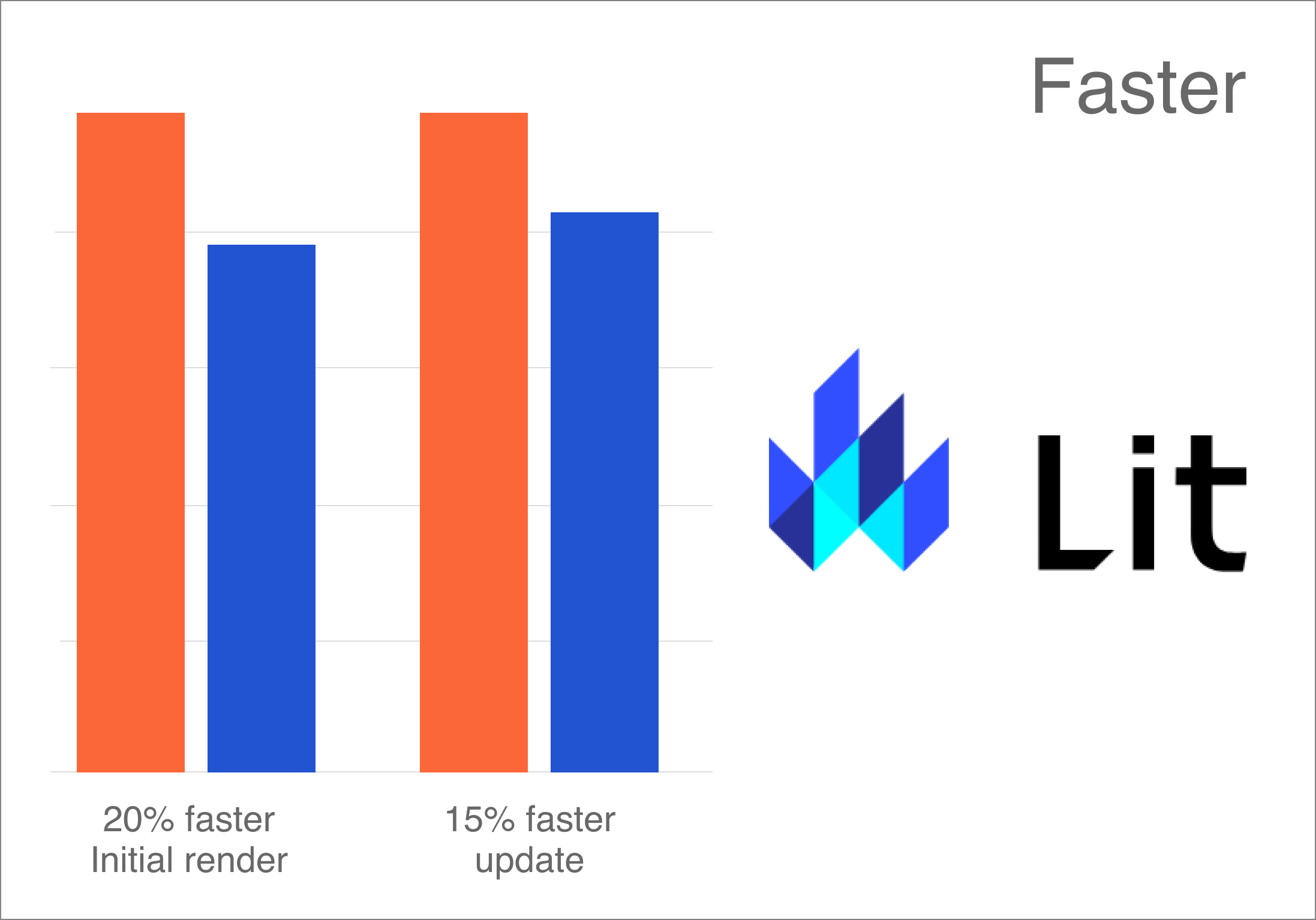
Lit 2.0 is faster at initial render and update

The library authors claim that Lit 2.0 is up to 20% faster on initial rendering and up to 15% faster on updates.

Also, it's good to know that Lit templates are efficient in keeping track of the UI, and only updates on re-rendering. These powerful features come along with interoperability in mind: they can work anywhere you use HTML with or without any framework.

Server-Side Rendering

Yes, Lit 2.0 comes with a server package for rendering Lit templates and components on the server, along with a flexible client-side "hydration".

The package name is below @lit-labs/ssr since it's a pre-release software at this time. However, it's expected to support a wide range of use cases:

  • App rendering frameworks built on top of web components.
  • Framework-specific plugins for rendering custom elements such as React or Angular.
  • Integration with static site generators.

You can be up-to-date about this server-side rendering support by following the news in this repository.

Connect with Lit

Lit 2.0 is not only about the cool features that are already described above, it comes along with a brand-new logo, a new website, and a welcoming community.

Why Lit?

The Web Components written with Lit are natively supported by browsers and they can be a perfect solution to share components across your application.

Also, Lit can be a useful solution to create your set of components through the Design System defined by your organization. This is even more helpful when your team uses multiple libraries and frameworks to build applications!

Community

You can be the first to know the good news about Lit and the upcoming releases. Share your ideas and projects with the community.

  • Join the conversations on Twitter: @buildWithLit
  • Send your issues or even better, help with Pull Requests on GitHub
  • Send your questions and help with technical issues on StackOverflow. Use lit, lit-html and lit-element as the related tags.
  • Finally, you can be part of lit-and-friends on Slack.

Just always remember to be nice to each other!

Playground

If you are a Developer who really enjoys and thinks through interactive examples, you cannot miss the Lit Playground website, which comes with the classic "Hello World" examples (using JavaScript and TypeScript), and others covering template concepts, directives, and more.

Conclusion

In case you were using both LitElement and lit-html (like me), it could be a great opportunity to upgrade your code to Lit 2.0. The general idea to do this involves updating the npm packages, importing paths, updating any custom directive, and using the class-based API or even adapt to minor breaking changes. Luckily, there is a guide available for upgrades.

If you're new in the world of Web Components, welcome! There is a step-by-step Lit tutorial available too.

Feel free to reach out on Twitter if you have any questions. Follow me on GitHub to see more about my work. Be ready for more articles about Lit on this blog.

About the author

Luis Aviles

Luis Aviles

Senior Software Engineer

Luis is a Senior Software Engineer and Google Developer Expert in Web Technologies and Angular. He is an author of online courses, technical articles, and a public speaker. He has participated in different international technology conferences, giving technical talks, workshops, and training sessions. He’s passionate about the developer community and he loves to help junior developers and professionals to improve their skills. When he’s not coding, Luis is doing photography or Astrophotography.

Keep reading

View all posts →

I Broke My Hand So You Don't Have To (First-Hand Accessibility Insights)

A perspective of a temporarily impaired developer on accessibility both from the perspective of a user and of a software engineer. Using the web disabled “surprisingly” makes you think about people’s experience on the web. Let us take you on that journey!...

Jan Kaiser5 mins
AccessibilityA11yWeb DevelopmentHTML

Understanding Vue's Reactive Data

A blog post that unravel how Reactivity works in Vue 3...

Jesús Padrón7 mins
VueJavaScriptTypeScriptWeb Development

A Tale of Form Autofill, LitElement and the Shadow DOM

Many web applications utilize forms in places be it for logging in, making payments, or editing a user profile. As a user of web applications, you have probably noticed that the browser is able to autofill in certain fields when a form appears so that you don't have to do it yourself. If you've ever written an application in Lit though, you may have noticed that this doesn't always work as expected. The Problem I was working on a frontend project utilizing Lit and had to implement a login form. In essence these aren’t very complicated on the frontend side of life. You just need to define a form, put some input elements inside of it with the correct type attributes assigned to it, then you hook the form up to your backend, API, or whatever you need to call to authenticate by adding a submit handler. However, there was an issue. The autocomplete doesn’t appear to be working as expected. Only the username field was being filled, but not the password. When this happened, I made sure to check documentation sites such as MDN and looked at examples. But I couldn’t find any differences between theirs and mine. At some point, I prepared a minimal reproducible example without Lit, and I was able to get the form working fine, so it had to do something with my usage of Lit. After doing a little bit of research and some testing, I found out this happened because Lit relies very heavily on something known as the Shadow DOM. I don’t believe the Shadow DOM is necessarily supposed to break this functionality. But for most major browsers, it doesn’t play nice with autocomplete for the time being. I experienced slightly different behavior in all browsers, and the autocomplete even worked under Shadow DOM with Firefox in the Lit app I was working on. The solution I ended up settling on was ensuring the form was contained inside of the Light DOM instead of the Shadow DOM, whilst also allowing the Shadow DOM to continue to be used in places where autofillable forms are not present. In this article I will show you how to implement this solution, and how to deal with any problems that might arise from it. Shadow DOM vs. Light DOM The Shadow DOM is a feature that provides a way to encapsulate your components and prevent unrelated code and components from affecting them in undesired ways. Specifically, it allows for a way to prevent outside CSS from affecting your components and vice versa by scoping them to a specific shadow root. When it comes to the Light DOM, even if you’ve never heard of the term, you’ve probably used it. If you’ve ever worked on any website before, and interacted with the standard DOM tree, that is the Light DOM. The Light DOM, and any Shadow DOMs under it for that matter, can contain Shadow DOMs inside of them attached to elements. When you add a Lit component to a page, a shadow root will get attached to it that will contain its subelements, and prevent CSS from outside of that DOM from affecting it. Using Light DOM with Certain Web Components By default, Lit attaches a shadow root to all custom elements that extend from LitElement. However, web components don’t actually require a shadow root to function. We can do away with the shadow root by overriding the createRenderRoot method, and returning the web component itself: Although we can just put this method in any element we want exposed into the Light DOM. We can also make a new component called LightElement that overrides this method that we can extend from instead of LitElement on our own components. This will be useful later when we tackle another problem. Uh oh, where did my CSS styling and slots go? The issue with not using a shadow root is Lit has no way to encapsulate your component stylesheets anymore. As a result, your light components will now inherit styles from the root that they are contained in. For example, if your components are directly in the body of the page, then they will inherit all global styles on the page. Similarly when your light components are inside of a shadow root, they will inherit any styles attached to that shadow root. To resolve this issue, one could simply add style tags to the HTML template returned in the render() method, and accept that other stylesheets in the same root could affect your components. You can use naming conventions such as BEM for your CSS classes to mitigate this for the most part. Although this does work and is a very pragmatic solution, this solution does pollute the DOM with multiple duplicate stylesheets if more than one instance of your component is added to the DOM. Now, with the CSS problem solved, you can now have a functional Lit web component with form autofill for passwords and other autofillable data! You can view an example using this solution here. A Better Approach using Adopted Stylesheets For a login page where only one instance of the component is in the DOM tree at any given point, the aforementioned solution is not a problem at all. However, this can become a problem if whatever element you need to use the Light DOM with is used in lots of places or repeated many times on a page. An example of this would be a custom input element in a table that contains hundreds of rows. This can potentially cause performance issues, and also pollute the CSS inspector in your devtools resulting in a suboptimal experience both for users and yourself. The better, though still imperfect, way to work around this problem is to use the adopted stylesheets feature to attach stylesheets related to the web component to the root it is connected in, and reuse that same stylesheet across all instances of the node. Below is a function that tracks stylesheets using an id and injects them in the root node of the passed in element. Do note that, with this approach, it is still possible for your component’s styles to leak to other components within the same root. And like I advised earlier, you will need to take that into consideration when writing your styles. This solution works for most browsers, and a fallback is included for Safari as it doesn’t support adoptedStylesheets at the time of writing this article. For Safari we inject de duplicated style elements at the root. This accomplishes the same result effectively. Let’s go over the evictDisconnectedRoots function that was called inside of the injection function. We need to ensure we clean up global state since the injection function relies on it to keep duplication to a minimum. Our global state holds references to document nodes and shadow roots that may no longer exist in the DOM. We want these to get cleaned up so as to not leak memory. Thankfully, this is easy to iterate through and check because of the isConnected property on nodes. Now we need to get our Lit component to use our new style injection function. This can be done by modifying our LightElement component, and having it iterate over its statically defined stylesheets and inject them. Since our injection function contains the de duplication logic itself, we don’t need to concern ourselves with that here. With all that you should be able to get an autocompletable form just like the previous example. The full example using the adopted stylesheets approach can be found here. Conclusion I hope this article was helpful for helping you figure out how to implement autofillable forms in Lit. Both examples can be viewed in our blog demos repository. The example using basic style tags can be found here, and the one using adopted stylesheets can be found here....

Jamie Kuppens6 mins
Lit

Performance Analysis with Chrome DevTools

When it comes to performance, developers often use Lighthouse or similar performance analysis tools. But when the target site has protection against bots, getting information is not that simple. Chrome Devtools can help you with your performance analysis....

Balázs Tápai6 mins
DevToolsSEOWeb PerformanceWeb Development