Javascript

Building a Stripe App: A Step-by-Step Guide to QR Code Generation

Danny Thompson
4 min read
This article was written over 18 months ago and may contain information that is out of date. Some content may still be relevant, but please refer to official documentation for the latest information.

Building a Stripe App: A Step-by-Step Guide to QR Code Generation

Why Build a Stripe App?

I recently participated in an audio space with the Stripe team, and something they said really stuck with me: the Stripe app store is a growing area that isn't overly saturated yet. There's a lot of potential for new apps, and companies can use this opportunity to grow.

I work at a company called This Dot Labs, and we've created several Stripe apps and even own one. After looking at the data, I can confirm that the Stripe team was right!

Creating a QR Code Generator App

For this tutorial, we'll build a QR code app that can take a URL and generate a code for it. This is a good use case to help you understand the ins and outs of Stripe's developer tools. stripeQRCode

Why QR Codes?

QR codes are useful tools that have become common in e-commerce, restaurants, and other industries. While Stripe already has a QR code tool, we'll make our own to familiarize ourselves with their syntax and problem-solving approaches.

Project Structure

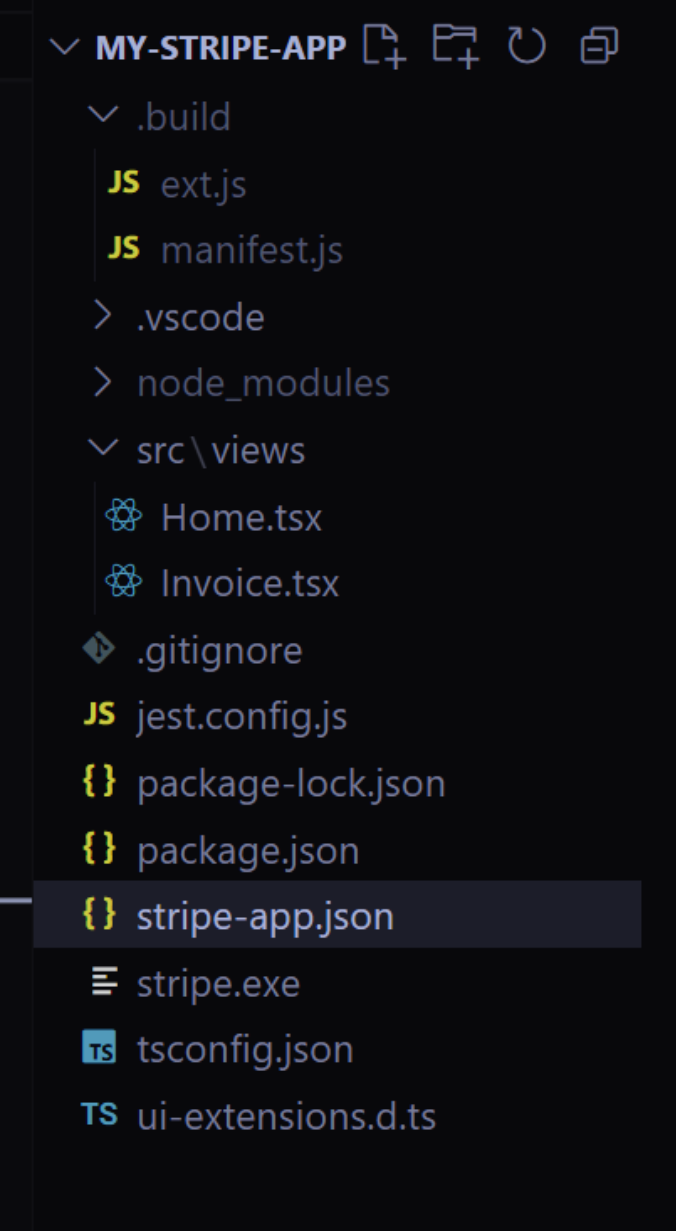
Before we dive into the implementation, let's look at the structure of our Stripe App QR Code project:

  • .vscode: Contains settings for Visual Studio Code
  • source/views: Holds the main application views
  • .gitignore: Specifies files to ignore in version control
  • stripe-app.json: Defines the Stripe app configuration
  • ui-extensions.d.ts: TypeScript declaration file for UI extensions
  • .build: this is where the built Stripe app gets placed. image (85)
Step-by-Step Implementation

1. Install Stripe Locally

First, you need to install Stripe on your local machine. The documentation provides great instructions for this:

  • For Mac users: Use Brew to install
  • For Windows users: Download the package and add it to your environment variables

You can find the details here in the stripe docs to install the Stripe CLI https://docs.stripe.com/stripe-cli

When using Windows, you must do stripe login from Powershell, NOT from Git bash or any other tool. After the server is up, then you can continue using git bash for everything else. After stripe login, you need to enter stripe apps start. Once you do that, the server is up and running and you can go back to using git bash or any other tool.

2. Install Dependencies

We'll be using an extra package for QR code generation. Install it using npm:

npm install qrcode

3. Set Up the Main Component

Let's look at the home.tsx file, where we'll use Stripe's UI components:

import { Box, ContextView, Button, TextField, Banner } from 
'@stripe/ui-extension-sdk/ui';

These components are similar to other UI libraries like Bootstrap or Tailwind CSS.

4. Create the UI Structure

Our app will have:

  • An input field for the URL
  • Validation using a regex pattern
  • Error handling for invalid URLs
  • QR code generation and display

Here is the Home.tsx file that is located in the src/views folder image (86)

import {
  Box,
  ContextView,
  Button,
  TextField,
  Img,
  Banner,
} from "@stripe/ui-extension-sdk/ui";
import { useState } from 'react';
import QRCode from 'qrcode';
const Home = () => {
  const [url, setUrl] = useState('');
  const [qrCode, setQrCode] = useState('');
  const [error, setError] = useState('');
  const generateQRCode = async () => {
    try {
      if (!url) {
        setError("Please enter a URL.");
        return;
      }
//basic regex pattern for URL validation
      const urlPattern = new RegExp(
        '^(https?:\\/\\/)?' +
        '((([a-z\\d]([a-z\\d-]*[a-z\\d])*)\\.)+[a-z]{2,}|' +
        '((\\d{1,3}\\.){3}\\d{1,3}))' +
        '(\\:\\d+)?(\\/[-a-z\\d%_.~+]*)*' +
        '(\\?[;&a-z\\d%_.~+=-]*)?' +
        '(\\#[-a-z\\d_]*)?', 'i'
      );
      if (!urlPattern.test(url)) {
        setError("Please enter a valid URL (e.g., https://example.com)");
        return;
      }
      const qrCodeDataUrl = await QRCode.toDataURL(url, {
        width: 200,
        margin: 2,
      });
      setQrCode(qrCodeDataUrl);
      setError('');
    } catch (error) {
      console.error("Error generating QR code", error);
      setError("Failed to generate QR Code. Please try again.");
    }
  };
  return (
    <ContextView
      title="URL QR Code Generator"
      brandColor="#635bff"
      externalLink={{
        label: "Stripe Docs",
        href: "https://stripe.com/docs",
      }}
    >
      <Box css={{ stack: "y", rowGap: "large", padding: "medium" }}>
        <Box css={{ font: "heading", marginBottom: "medium" }}>
          Generate User Payment QR Code
        </Box>
        <TextField
          label="Enter URL"
          placeholder="https://example.com"
          value={url}
          onChange={(e) => setUrl(e.target.value)}
          type="url"
        />
        {error && (
          <Banner
            type="critical"
            title="Error"
            description={error}
          />
        )}
        <Button
          type="primary"
          onPress={() => generateQRCode()}
          disabled={!url}
        >
          Generate QR Code
        </Button>
        {qrCode && (
          <Box css={{
            stack: "y",
            rowGap: "medium",
            alignSelfY: "center",
            marginTop: "large"
          }}>
            <Box css={{ font: "heading" }}>Your QR Code</Box>
            <Img
              src={qrCode}
              alt="Generated QR Code"
            />
            <Button
              type="secondary"
              onPress={() => {
                window.open(qrCode, '_blank');
              }}
            >
              Download QR Code
            </Button>
          </Box>
        )}
      </Box>
    </ContextView>
  );
};
export default Home;
  • ContextView` is at the top level of the app where we see the Title and the link to the Stripe Docs that we placed in our Context View.
  • Box is how you use Divs.
  • Banners can be used to show notification errors or any other item you wish to display.
  • Textfields are input fields.
  • Everything else is pretty self-explanatory.

5. Handle Content Security Policy

One problem I personally ran into was when I tried to redirect users, the Stripe policies would block it since I did not express that I knew what it was doing. I had to go into the stripe-app.json file and mention the specific security policies. For this particular exercise, I kept these as null.

This is my stripe-app.json file.

{
    "id": "com.example.my-stripe-app",
    "version": "0.0.1",
    "name": "My Stripe App",
    "icon": "",
    "permissions": [],
    "stripe_api_access_type": "platform",
    "ui_extension": {
        "views": [
            {
                "viewport": "stripe.dashboard.home.overview",
                "component": "Home"
            },
            {
                "viewport": "stripe.dashboard.invoice.detail",
                "component": "Invoice"
            }
        ],
        "content_security_policy": {
            "connect-src": null,
            "image-src": null,
            "purpose": ""
        }
    }
}

6. Configure App Views

As you can see here, the stripe-app.json file shows the views for each file I have. The Home.tsx file and the Invoice.tsx are also included This is our way of saying that for each view we have, show the app functionality on that page. Our stripe-app.json file will show it but also, the manifest.js file in our .build folder will also show the same. Any view that doesn't have a file will not show the application's functionality. So, if I were to go to transactions, the app would not show the same logic as the home or invoices page.

By following these steps, you'll have a fully functional QR code generator app for Stripe. This is just a simple example, but the potential for Stripe apps is massive, especially for businesses serving e-commerce customers.

If you need help or get stuck, don't hesitate to reach out, danny.thompson@thisdot.co. The Stripe team is also very active in answering questions, so leverage them as a resource. Happy coding!

About the author

Danny Thompson

Danny Thompson

Director of Technology, This Dot Labs

Keep reading

View all posts →

This Dot AI Field Notes - Anatomy of a Coding Harness

A coding agent is not magic, it’s a loop. We call this a harness. The harness is a deterministic layer of code that wraps an LLM....

1 min
AI

AI Is Speeding Up Development. But Where Are the New Bottlenecks?

AI is accelerating development, but it’s also exposing everything else that’s broken. At the Leadership Exchange, leaders unpacked how AI is reshaping the SDLC and what organizations need to address beyond just coding to make adoption successful. Moderated by Rob Ocel, VP of Innovation at This Dot Labs, the panel featured Itai Gerchikov at Anthropic and Harald Kirschner, Principal Product Manager for GitHub Copilot & VS Code at Microsoft. Panelists explored the current state of AI adoption across the software development lifecycle and shared practical insights into how organizations can effectively integrate AI tools. Panelists discussed how companies are investing in AI tools, skills, and managed competency programs to support developers. While AI can dramatically accelerate coding, the panel emphasized that adoption affects every stage of the SDLC. Bottlenecks now appear in testing, DevOps, product delivery, and marketing as AI speeds up development. Organizations that address technical debt and process inefficiencies are better positioned to extract maximum value from AI tools. The conversation also focused on opportunities and risks. Security, governance, and workforce education were highlighted as critical factors for adoption. Panelists stressed that AI initiatives should be aligned with broader business goals rather than pursued in isolation. They noted that companies experimenting at the cutting edge need to consider organizational readiness just as carefully as technical capabilities. Panelists also explored how leading organizations are navigating the early stages of adoption. Those ahead of the curve are using structured experimentation, prioritizing process improvements, and continuously evaluating outcomes to refine their AI strategies. Learning from these early adopters allows other organizations to anticipate emerging trends and prepare for the next phase of AI adoption rather than simply replicating past approaches. Key Takeaways Investing in AI skills and tools should be done thoughtfully, with clear alignment to business objectives. Examining the full SDLC helps identify bottlenecks that AI may accelerate or expose. Organizations can gain a competitive advantage by learning from early adopters and planning for where AI adoption is heading. AI adoption is not just a technical initiative; it is a strategic transformation that requires attention to people, process, and technology. Organizations that balance innovation with operational discipline will be best positioned to capture the full potential of AI across the software lifecycle. Seeing similar challenges in your own SDLC? Let’s compare notes. Join us at an upcoming Leadership Exchange or reach out to continue the conversation. Tracy can be reached at tlee@thisdot.co....

Calypso Hernandez2 mins
AI AdoptionAILeadership ExchangeEngineering Leadership

Making AI Deliver: From Pilots to Measurable Business Impact

A lot of organizations have experimented with AI, but far fewer are seeing real business results. At the Leadership Exchange, this panel focused on what it actually takes to move beyond experimentation and turn AI into measurable ROI. Over the past few years, many organizations have experimented with AI, but the challenge today is translating experimentation into measurable business value. Moderated by Tracy Lee, CEO at This Dot Labs, panelists featured Dorren Schmitt, Vice President IT Strategy & Innovation at Allen Media Group, Greg Geodakyan, CTO at Client Command, and Elliott Fouts, CAIO & CTO at This Dot Labs. Panelists discussed how companies are moving from early AI experiments to initiatives that deliver real results. They began by examining how experimentation has evolved over the past year. While many organizations did not fully utilize AI experimentation budgets in 2025, 2026 is showing a shift toward more intentional investment. Structured budgets and clearly defined frameworks are enabling companies to explore AI strategically and identify initiatives with high potential impact. The conversation then turned to alignment and ROI. Panelists highlighted the importance of connecting AI projects to corporate strategy and leadership priorities. Ensuring that AI initiatives translate into operational efficiency, productivity gains, and measurable business impact is essential. Companies that successfully align AI efforts with organizational goals are better equipped to demonstrate tangible outcomes from their investments. Moving from pilots and proofs of concept to production was another major focus. Governance, prioritization, and workflow integration were cited as essential for scaling AI initiatives. One panelist shared that out of nine proofs of concept, eight successfully launched, resulting in improvements in quality and operational efficiency. Panelists also explored the future of AI within organizations, including the potential for agentic workflows and reduced human in the loop processes. New capabilities are emerging that extend beyond coding tasks, reshaping how teams collaborate and how work is structured across departments. Key Takeaways Structured experimentation and defined budgets allow organizations to explore AI strategically and safely. Alignment with business priorities is essential for translating AI capabilities into measurable outcomes. Governance and workflow integration are critical to moving AI initiatives from pilot stages to production deployment. Successfully leveraging AI requires a balance between experimentation, strategic alignment, and operational discipline. Organizations that approach AI as a structured, measurable initiative can capture meaningful results and unlock new opportunities for innovation. Curious how your organization can move from AI experimentation to real impact? Let’s talk. Reach out to continue the conversation or join us at an upcoming Leadership Exchange. Tracy can be reached at tlee@thisdot.co....

Calypso Hernandez2 mins
AI AdoptionAILeadership ExchangeEngineering Leadership

What does it actually look like to build software with AI today? Not in theory, but in practice.

What does it actually look like to build software with AI today? Not in theory, but in practice. At the Leadership Exchange, this was the question at the center of the Developer Panel, where leaders from across the industry unpacked what’s really changing inside engineering teams and what organizations need to do right now to keep up. The Developer Panel at the Leadership Exchange explored the cutting edge of AI in software engineering and examined what organizations should focus on today to prepare for the future. Moderated by Jeff Cross, Co Founder & CEO at Nx, the panel featured Victor Savkin, Cofounder & CTO at Nx, Alex Sover, Vice President of Engineering at OpenAP, Brent Zucker, Senior Director of Engineering at Visa, and Jonathan Fontanez, AI Engineering Lead at This Dot Labs. Panelists shared insights into how AI is transforming the software development lifecycle and how teams can adopt tools effectively while preparing for organizational change. Panelists discussed emerging workflows, including CI in the loop, agentic healing, and context engineering. They examined how validation, code reviews, and PRDs are evolving alongside AI capabilities and how teams are integrating external sources such as production traces to improve quality and reliability. The discussion also covered what the next generation of agentic tools might look like and how these capabilities will shape engineering practices in the near future. Adoption of AI comes with challenges. Teams often rely on plugins or extensions without foundational understanding, and individual contributors may fear displacement. Panelists emphasized that education, governance, and skill building are essential for teams to manage AI agents effectively while maintaining quality. They also highlighted the need to standardize workflows and ensure organizational alignment to fully leverage AI capabilities. The conversation extended beyond technical challenges to organizational implications. Panelists discussed how teams can avoid issues like Conway’s Law, manage distributed teams effectively, and evolve engineering practices alongside AI adoption. Leadership and management strategies play a crucial role in ensuring that AI integration delivers meaningful outcomes while maintaining efficiency and alignment with business objectives. Key Takeaways AI workflows require both technical and organizational preparation. Education, governance, and skill development are essential for successful implementation. Forward looking teams are rethinking validation, CI pipelines, and context management to fully leverage agentic AI. The discussion highlighted that adopting AI at the cutting edge is not just about new tools it is about rethinking processes, workflows, and organizational culture. Companies that embrace this holistic approach are most likely to succeed in leveraging AI to its full potential. Are you interested in more conversations like this? Message us for an invite to the next, or for a private discussion around these topics. Tracy can be reached at tlee@thisdot.co....

Calypso Hernandez2 mins
AI AdoptionAILeadership ExchangeEngineering Leadership